Quote, book, invoice, get paid. Type it once.
One record per car, for PPF, tint, wrap and detail shops. The quote becomes the job on the calendar, the job becomes the invoice, and the invoice takes the card — with the customer, the vehicle and your crew's hours already on it.
Free for 14 days · card required · cancel anytime
- Plans from $79/mo
- We import your book for you
- Your booking page is live the same day
2024 Tesla Model 3 · Marcus D.
Quote
$3,480
Full front PPF + ceramic · margin 61%
Approved online/quotesBooked
$700
Thu 9:00am · Bay 2 · 2 days
Deposit paid/calendarInvoice
$2,780
INV-1042 · the job's own priced lines
Balance due/invoicesPaid
$2,780
Visa ···4242 · on pickup
Paid in full/invoices/1042
Then it closes back onto the customer — one owner, one vehicle, one history, and the hours your crew put into it.
Step oneapp.servicevin.com/quotes
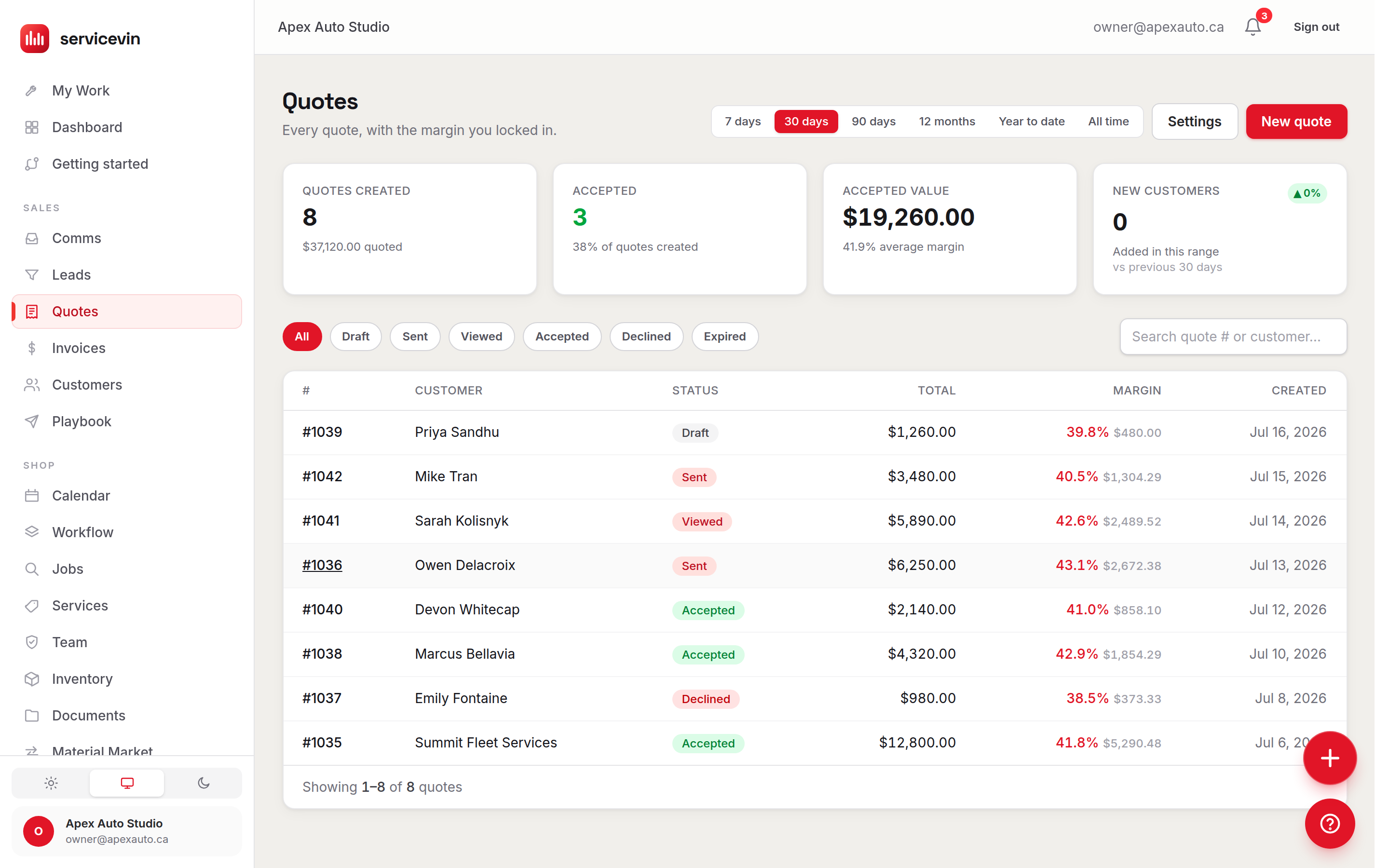
The money is decided on the quote.
So that is where the record starts. Build it line by line and watch margin move as you type — costed from the film actually on your shelf, not from a number you half-remember. Send it, and your customer approves it online, takes the add-ons they want and puts a deposit down.
- Live margin in dollars and per cent while you build, not in a report you run at month end
- Approved online, with upsells and a deposit — no phone tag to close it
- Saved templates for the jobs you quote every week, so the second Model 3 is not built from scratch
Step twoapp.servicevin.com/calendar
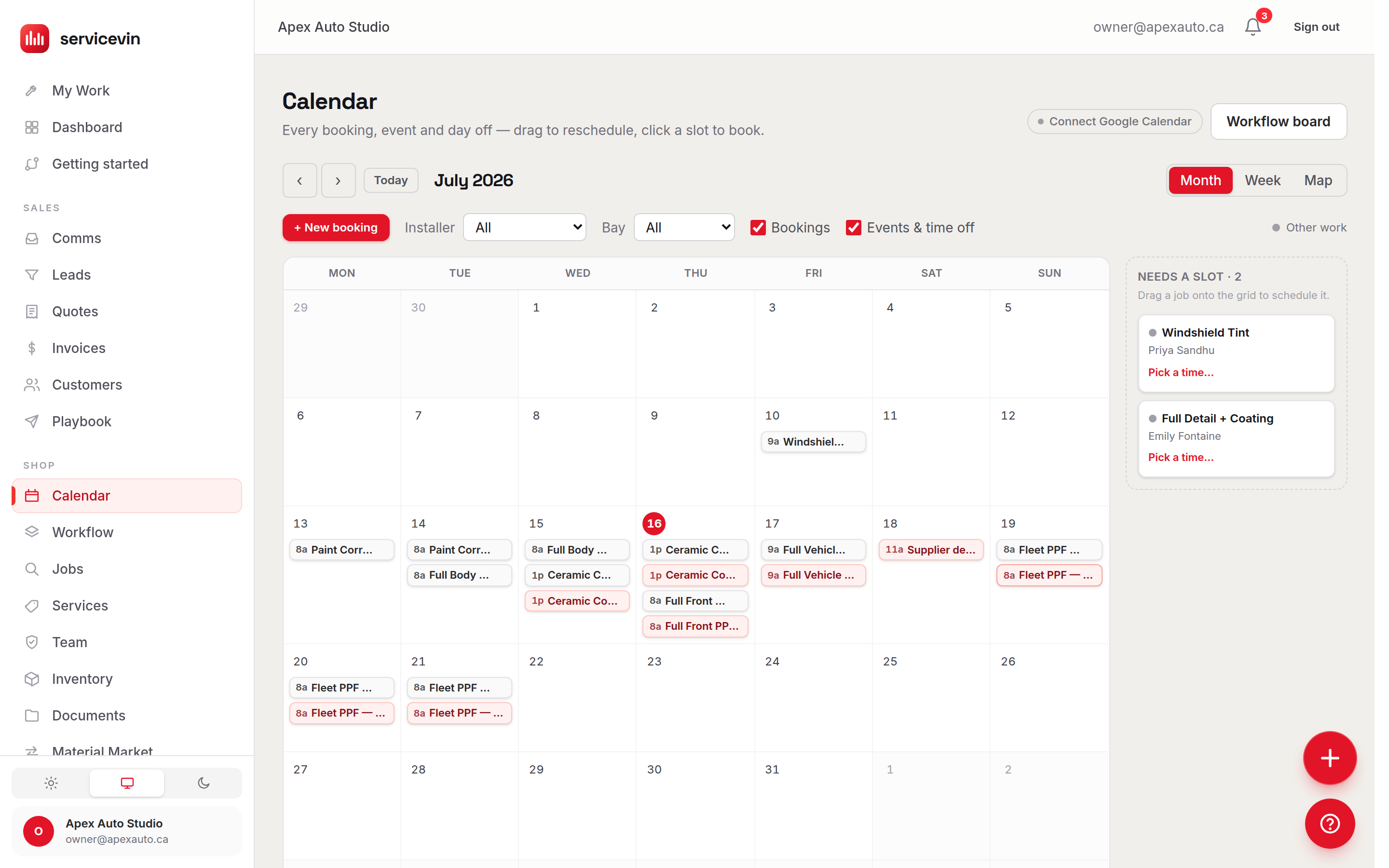
A yes puts a car in a bay.
The approved quote becomes a scheduled job carrying its own work and its own prices — same customer, same vehicle, nothing retyped. The jobs you don't quote yourself, your booking page takes: every shop has one the moment the shop exists.
- Bays and installers on one drag-and-drop board, with double-booking blocked in the database
- A booking page at
book.servicevin.com/your-shopwith nothing to set up — or on your own domain with one CNAME - Deposits taken at the time of booking, and credited on the final bill
Step threeapp.servicevin.com/invoices
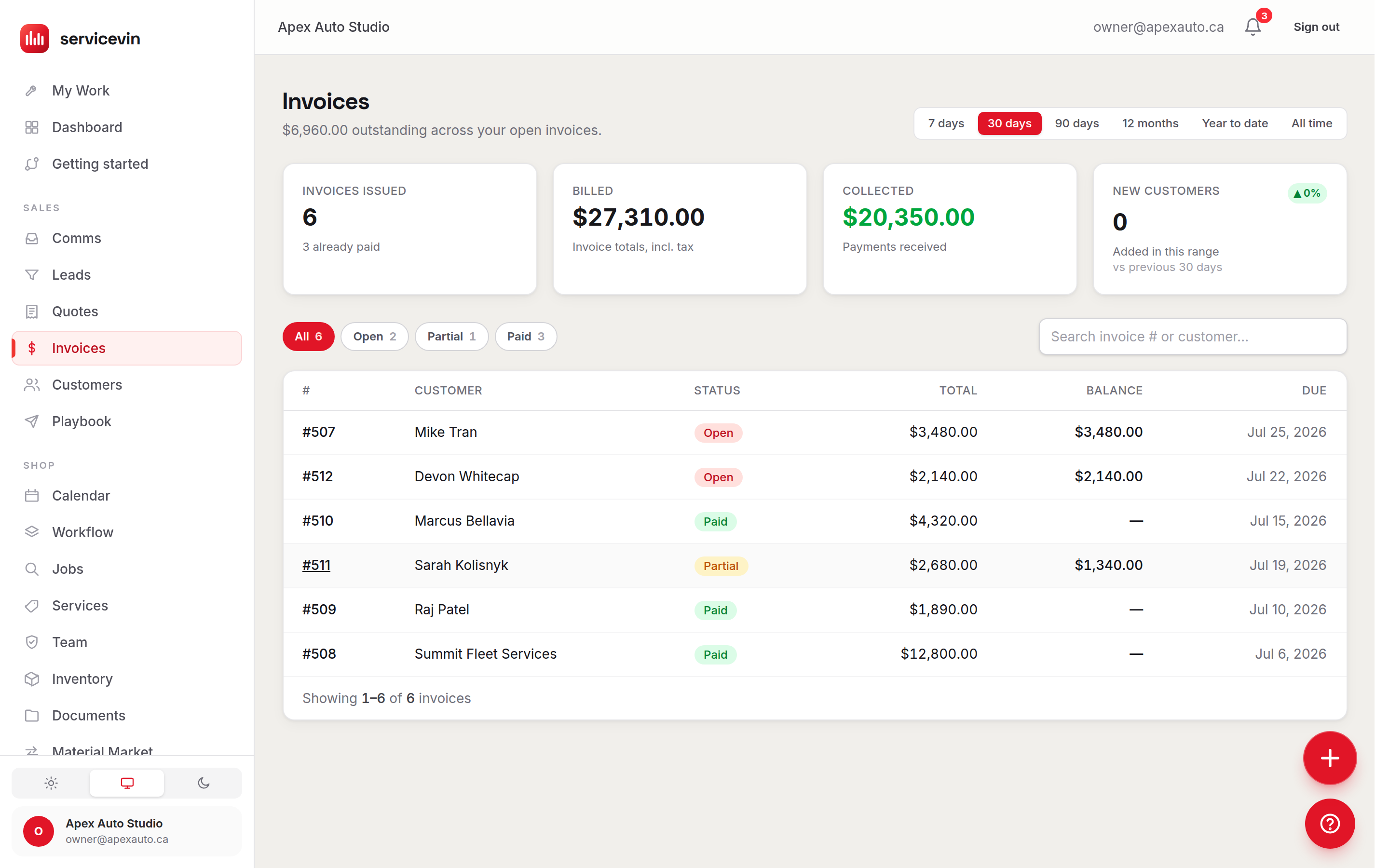
The invoice is the job. You don't build it twice.
Finish the work and the bill is already the job's own priced lines, change orders and all. Nothing is copied from one system into another, so nothing is copied wrong — and the deposit you took at booking is on it, not stranded somewhere else.
- Change orders and counter edits are on the bill because they were on the job
- One bill per job — a deposit taken against the quote lands on that bill, so nobody is ever asked to pay it twice
- Every invoice sits on the customer's record beside the vehicle it was for
Step fourTheir phone, your invoice
They pay on the record that quoted them.
A card at the desk, a deposit online, a partial now and the balance on pickup. It runs through Stripe as a direct charge on your own connected account — your shop is the merchant of record, and Stripe pays out to you on your account's normal schedule.
- Card payments, deposits, partials and guards against over-collecting
- A card surcharge, if you charge one, is on the invoice, the receipt and the report — not missing from all three
- Automatic follow-ups chasing what is unpaid, from rules you can read and editGrowth and up
Summit Detail Co
Invoice INV-1042 · 2024 Tesla Model 3
Balance due
$2,780.00
- Full front PPF + ceramic
- $3,480.00
- Deposit received · Mar 4
- −$700.00
Charged on the shop’s own Stripe account
That is the whole loop, and it is one login.
Four steps, one record, nothing retyped between them. PPF, tint, wrap, ceramic or detailing — the plan that runs all of it starts at $79/mo.
14-day free trial — card required, nothing charged for 14 days, cancel anytime
The half nobody expectsThe installer app
Your crew's hours are on that same job.
This is the part shops don't know is in the box. The job your customer's deposit runs through is the job your installers clock into — so the labour on a car is measured, not estimated at the end of the month from memory.
- They clock in from the bay on their own phone, not from a sheet by the office door
- A stopwatch per work item, running against the time you expected it to take
- Flat-rate and hourly pay adding up live, so nobody has to ask what they made today
- That pay lands on the job, so a car's labour cost comes off a stopwatch instead of a guess
- A technician never sees what you charge — no prices, no customer contact details, ever
Today
Clocked in 7:58am
2024 Tesla Model 3 · Bay 2
Full front — hood, fenders, bumper
1:12:40
est. 2:00
Ceramic coat
Not started
est. 1:30
Your pay today
Flat rate + hourly
$184.50
Customer pricing and contact details are not on this screen
“Moving everything sounds like a nightmare.”
It is the reason shops stay on a spreadsheet for another year, so we took it off you: you don't do the migration, we do. Export a CSV from whatever you run today and our team maps it, dry-runs it against a preview and loads it.
You export a CSV. We do the rest.
Urable, Tint Wiz, OrbisX, QuickBooks Online and Zoho Books have native presets. Everything else — Jobber and Housecall Pro included — comes across on the any-CSV path, which our team still maps and dry-runs for you. There is no importer to learn.
Your customers never hear a peep.
Importing never texts or emails them. No message and no automation fires when records are added — it is enforced in our code and covered by our own tests, not a setting somebody remembers to leave off.
One click undoes it, for 24 hours.
An import can be reversed for 24 hours afterwards, removing the records it added — as long as you have not started working them yet. It is a real safety net for the first load.
Go-live target: 48 hours from your file.
A target, not a promise, and the clock starts when your CSV lands with us. You can keep running your current tool the whole time you are looking.
What comes across: customers, vehicles, invoice history, job history and open leads. What doesn’t yet: photos, quotes, notes and appointment history. We would rather you knew that now than after your file is loaded.
Before you start.
The five things shops ask on the way in.
Do I have to move everything over on day one?
No. Most shops start by quoting the next car that walks in and sending that one invoice. Your booking page is live from the moment you sign up, and the rest is already there when you want it — nothing has to be switched on in a particular order. Bring your book across whenever you are ready; our team does the mapping.
Does the free trial need a credit card?
Yes. 14-day free trial — card required, nothing charged for 14 days, cancel anytime. You can load your book and test the whole loop before paying anything.
What does it cost?
Three flat plans — Essentials $79, Growth $199 and Command $399. The whole loop on this page — quoting, booking, invoicing, taking the card, and your crew’s clock — runs on the entry plan at $79/mo. The automatic follow-ups are the one thing above that needs a bigger plan, and they are marked with it. Team logins are unlimited from Growth up, so adding your crew does not change the bill.
Will my installers see what I charge the customer?
No. The installer app never shows customer pricing or contact details. A technician sees the work assigned to them, their own stopwatch against the time you expected, and their own pay adding up — and nothing else.
What actually transfers when you migrate my shop?
Customers, vehicles, invoice history, job history and open leads. Photos, quotes, notes and appointment history do not come across via import today — we would rather tell you that now than after your file is loaded.
Quote it, close it, get paid for it — in one place.
Start with one car.
Quote the next job that walks in, book it, invoice it and take the card — on one record, in one login. Bring the rest of your book across when you are ready; we will do the mapping.
14-day free trial — card required, nothing charged for 14 days, cancel anytime