Sales Scripts that give your team the words to close more jobs.
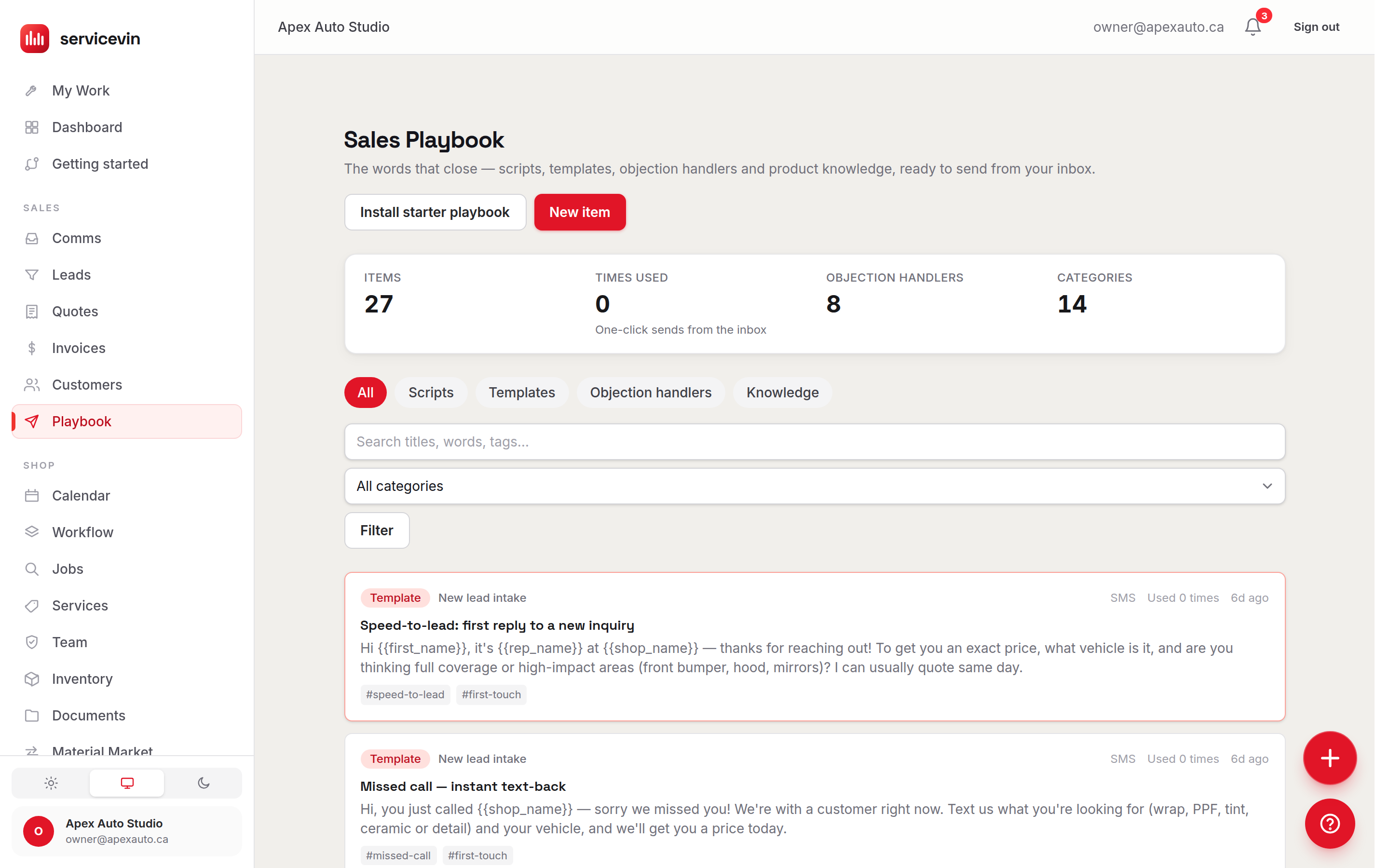
Objection handlers, response templates and product knowledge for wrap, PPF, tint, ceramic and detail shops. And unlike a binder, this one sends: one click from your inbox, the customer's details already filled in, and every use tracked so you know which script closes.
- 27 starter items included
- 14-day free trial
- No card required
“That's more than I expected” (PPF)
Totally fair — good film surprises people. Here's the honest math: a front-end respray costs real money and rarely matches factory paint…
Follow-up #2 — day 3 (soft deadline)
Hi {{first_name}}, quick one from {{shop_name}} — we're booking out about a week right now. If you'd like the {{vehicle}} in before that stretches…
Tint: the 4 questions every customer asks
1. 'WILL I GET PULLED OVER?' — Know your local limits cold and quote them. Always offer the darkest LEGAL option first…
The words that close — in every rep's hands
Everything your team needs to sell — in one place.
Most shops have one person who knows what to say. Sales Scripts turns that knowledge into a system the whole team runs on — and it improves every time someone writes a better line.
Proven scripts
Word-for-word responses to the situations your team hits every day — new leads, quotes going quiet, price pushback — written for the film-and-detail trade, not generic sales fluff.
Ready-made templates
Follow-up sequences, booking nudges, aftercare instructions, review requests and win-backs — quote-to-pickup covered, ready to send or make your own.
Faster onboarding
A new hire's first week comes with talk tracks and product one-pagers for every service you sell. They sound like your best rep long before they've earned the scars.
Best practices, baked in
The starter content carries the discipline with it: honest limits stated up front, the shop named in every text, SMS kept to two segments, aftercare that prevents the angry callback.
Saved replies, one click
Your best lines live inside the inbox. Pick a script and it lands in the composer with the customer's name, vehicle and your shop already filled in — edit or just hit send.
Retyped from a laminated sheet
One click, already filled in
Higher close rates
Every one-click send is recorded, so the library shows what actually gets used. Double down on the script that books jobs; retire the one nobody touches.
“I think that one works”
Used 42× this month
Give your team the knowledge to sell with confidence.
One-pagers and talk tracks for every service you offer — wrap, PPF, tint, ceramic and detailing. What it is, who buys it, the packages, the best lines, and the honest limits your reps should never oversell. New hires learn it; veterans quote it mid-conversation.
- Service explainers in plain words — 'PPF in 60 seconds', not a datasheet
- Good-better-best menu framing with upsell and downsell paths
- Comparison guides: PPF vs ceramic, ceramic vs dyed tint, pro vs DIY
- Honest-limits sections that stop over-promising before it happens
- Fully editable — fold in the film brands and packages you actually carry
WHAT IT IS
Typically an 8-mil clear urethane film, applied panel by panel. Self-heals light swirls with heat. Many top films carry warranties around ten years.
TALK TRACK
“It's not cosmetic — it's the difference between the ROAD hitting your paint and hitting a warrantied, replaceable layer instead.”
HONEST LIMITS
Won't stop dents. Won't fix existing chips (we touch up before install). Some panel edges can't be fully wrapped.
Sample dataSample data — an illustration of the screen, not a customer's account.
Turn hesitation into closed jobs.
The objections don't change much: price, timing, “the shop down the road is cheaper”, “I found a DIY kit”. I've fielded every one of them across my own front counter. Each script here acknowledges the concern, tells the honest truth, and ends with a next step — so the conversation moves instead of stalling.
- Price scripts that reframe against respray cost — with a downsell path, not a discount reflex
- “The shop down the road is cheaper” — the two questions that expose a bargain quote
- “I'll do it in the spring” — why winter is exactly backwards for protection
- “I need to think about it” — a discovery question, not another brochure
- Save your team's best lines: any rep's winning reply becomes a shared script
Sample dataSample data — an illustration of the screen, not a customer's account.
Standardize how your shop communicates with leads.
Templates for every touch from first inquiry to the review request: speed-to-lead replies, missed-call text-backs, a three-touch quote follow-up, deposit nudges, aftercare at pickup and win-backs for the ones that got away. Write it once, in your shop's voice — with variables where the details go.
- A 1-3-7 day quote follow-up sequence: add value, soft deadline, breakup text
- {{first_name}}, {{vehicle}}, {{quote_link}} — click a chip to drop a variable in
- Live preview shows the message with sample values as you type
- An SMS segment meter keeps texts to two segments — deliverability and cost
- Aftercare templates for PPF, wrap and tint that prevent the angry callback
Follow-up #2 — day 3 (soft deadline)
Preview
Hi Priya, quick one from Summit Detail Co— we're booking out about a week right now. If you'd like the Tesla Model Y in before that stretches, I can hold a bay with a deposit: wrp.st/q/8fK2212 chars · 2 SMS segments
Sample dataSample data — an illustration of the screen, not a customer's account.
A playbook nobody opens is a binder. Ours is a button.
Your saved replies sit one click from every conversation, arrive with the details filled in, and report back on what actually gets used. That's the difference between having scripts and running on them.
One-click insert
Your scripts live inside the inbox composer. Pick a script and it's in the box — no app-switching, no copy-paste, no retyping from a laminated sheet.
Variables, auto-filled
The customer's name, vehicle, your shop and your name drop in from the conversation itself. What lands in the composer is ready to send.
No blanks, ever
A variable the system can't fill stays visible — {{quote_link}} in plain sight — so a rep fills the gap instead of a blank sneaking into a customer text.
Edit before it sends
The script is a starting point, not a cage. Reps see the final text in the composer and can tweak the tone before hitting Send.
Usage, tracked
Every one-click send lands in an append-only ledger. The library shows use counts per script, so 'what works' is data, not opinion.
Team-wide, instantly
Improve a script once and every rep sends the better version from that moment on. Your shop's voice stays consistent, shift after shift.
Inbox · Priya S. — Tesla Model Y
“That's more than I expected” (PPF)
Totally fair, Priya — good film surprises people…
“Can you do any better on price?”
I keep pricing honest up front, so there's no fake…
One click — name, vehicle and shop already filled in.
Sample dataSample data — an illustration of the screen, not a customer's account.
One shelf, and the receipts for what works.
Scripts, templates, objection handlers and knowledge one-pagers in one searchable library — and a use count that tells you which of them your team actually reaches for.
From empty shelf to a library the whole crew sends from in three moves.
- 1
Install the starter scripts
One click adds 27 proven items — scripts, sequences, objection handlers and one-pagers written for wrap, PPF, tint, ceramic and detailing. - 2
Make it yours
Edit anything to match your shop's voice, drop in variables where the details go, and add the lines your best rep already uses. - 3
Send in one click
Reps pick a script in the inbox and it arrives filled-in and ready. Usage counts show you which words actually close.
- Starter items included
- 27Scripts, sequences, objections & one-pagers
- From script to sentIllustrative
- 1 clickStraight from the inbox, details filled in
- Blanks in customer textsIllustrative
- 0Unfilled variables stay visible, never invisible
- Usage on every scriptIllustrative
- LiveKnow which words close — it's data, not opinion
Figures marked Illustrative show how the mechanism works. They are not measured averages of Service VIN customers, and nothing on this site claims a result for your shop.
Scripts set the floor, not the ceiling — your results depend on your offers, pricing and follow-through.
Illustrative estimate — actual results depend on your offers, pricing and follow-through.
| Item | Winging it (%) | Same script every time (%) |
|---|---|---|
| Quoted jobs | 30% | 45% |
Questions, answered.
What is the Sales Scripts?
It's your shop's library of the words that sell: call-and-text scripts, response templates, objection handlers and product-knowledge one-pagers — organized by category, searchable, and wired directly into your inbox so any rep can send your best answer in one click. It ships with a starter library written specifically for wrap, PPF, tint, ceramic and detailing shops, and every item is fully editable.
How do proven scripts help convert more leads?
Speed and consistency. Most leads go cold waiting for a reply, or get a reply that rambles. With your scripts, the right response to 'how much?', 'that's expensive' or 'I'll think about it' is one click away — acknowledging the concern, telling the honest truth and ending with a next step. Every rep answers like your best rep, on their first week and at 6pm on a Saturday.
Can we customize the scripts or write our own?
Yes — that's the point. Managers can edit any item (including the prebuilt ones), duplicate a script to riff on it, organize items into their own categories and write new ones from scratch. Variable chips ({{first_name}}, {{vehicle}}, {{quote_link}}…) drop placeholders in as you write, and a live preview shows the message with sample values so what you see is what sends.
Does it include prebuilt templates?
Yes. One click installs 27 starter items: speed-to-lead and missed-call replies, a three-touch quote follow-up sequence, deposit and booking nudges, price/timing/comparison objection handlers, aftercare instructions for PPF, wrap and tint, review and referral requests, a win-back — plus team one-pagers for PPF, wrap, tint, ceramic and detailing. Installing again later only fills gaps; it never duplicates or overwrites your edits.
How does the one-click sending actually work?
Inside any inbox conversation there's a Snippets button. It opens a searchable picker of your SMS-fit scripts; choosing one drops the text into the composer with the customer's name, vehicle, your shop and your name already substituted from the conversation. The rep can edit before sending. If a variable can't be filled — say there's no quote link yet — it stays visible as {{quote_link}} so a human fills the gap; a blank never sneaks into a customer text.
How do I know which scripts are working?
Every one-click send is recorded in an append-only usage ledger, and the library shows a use count on each item. You see at a glance which objection handler your team actually reaches for and which template never gets touched — so improving the library becomes a data decision, not a guess.
Who can edit the scripts, and who can use them?
Everyone on the shop can read and send from the library — reps need the words. Creating, editing and deleting items is manager-gated, so your shop's voice stays curated. Both rules are enforced at the database level, not just in the interface.
It doesn't work alone
Where the words end up
- FeatureQuotes & InvoicingBuild margin-aware quotes from your real film cost, send them in a tap, and let customers approve and pay a deposit online.
- FeatureCRM & LeadsEvery lead, conversation and follow-up in one working list — the inbox your scripts send from, with AI win-back built in.
- FeatureAutomationsPut follow-ups, reminders and review requests on autopilot — with quiet hours and opt-outs handled for you.
Quote it, close it, get paid for it — in one place.
Start your free trial — no card required.
Install the starter scripts, make them sound like your shop, and send your best answer to every “how much?” in one click.
Free for 14 days, no card. Import your price list and quote a real job today.