Automations that put your shop's follow-ups & reminders on autopilot.
I run a PPF shop, and the follow-ups were always the first thing to slip — the quote I meant to chase, the review I forgot to ask for. Service VIN Automations turn every lead, quote and finished job into a workflow that runs itself: texts, reminders, review requests and AI win-backs, with quiet hours and opt-outs honored on every send. Set the rules once; your shop follows up every time, day or night.
- 14-day free trial
- No card required
TRIGGER
Customer texts your shop
Inbound to your shop number
ACTION
Send intro text
“Hey {first_name}, thanks for reaching out…”
ACTION
Notify the team
RESULT
Appointment booked
Runs on the tools your shop already uses
Live in minutes, not a weekend.
A workflow is a trigger, some steps and a switch. Watch one get built — then read the three moves it takes to do it yourself.
Trigger
Customer texts your shop
Inbound to your shop number
Action
Send intro text
Hey {first_name}, thanks for reaching out! Want to grab a time this week?
Conditions gate the whole run — if it doesn't pass, nothing sends.
Action
Notify the team
Result
Appointment booked
Sample dataSample data — an illustration of the screen, not a customer's account.
- 1
Pick a trigger
Choose the moment: a customer text, an accepted quote, a payment, a job stage, a finished job, or a lead you queue for win-back. - 2
Add your steps
Chain texts, emails, delays and team alerts — written in your shop's own voice. Add a step, reorder it, done. - 3
Switch it on
Turn it live and watch it run. Tweak anytime; every run is logged, and the safeguards never switch off.
Put your shop's busywork off your plate.
Every follow-up you keep meaning to send — the reminder, the review ask, the win-back text — becomes a workflow that just runs. Here's what you get out of the box.
39 activity triggers
Fire a workflow off the moments that matter: a customer text, an accepted quote, a payment, each job stage, a job completed, or a lead you queue for win-back.
SMS & email, built in
Send on-brand texts from your shop's own number and emails from your address — no extra tools, no copy-paste, no per-message add-ons.
Smart delays & quiet hours
Wait an hour, a day, or until 9am. Steps pause overnight and pick back up when your customers are actually awake to read them.
Automatic review requests
Ask for the 5-star review at the perfect moment after a finished job — and quietly route the unhappy replies to you first.
Lead nurture & win-back
Warm new leads in seconds and re-text the cold ones in your shop's own voice until they book — completely hands-free.
Compliance safeguards
Opt-outs, marketing consent, per-customer cooldowns and daily caps are enforced on every send. You can't accidentally spam your list.
Automations for every stage of the job.
Start from a proven template and make it yours, or build from scratch. These are the workflows shops turn on first.
Never let a new lead go cold.
In my shop, the first one to reply usually gets the job. Service VIN answers instantly, books the appointment, and keeps nudging until they show up — while you're heads-down on a hood.
- Text a new lead back within seconds, 24/7
- Auto-assign an advisor and send the booking link
- Fire appointment reminders that cut no-shows
- Re-engage quietly when a lead goes quiet
TRIGGER
New lead received
ACTION
Instant reply text
“Thanks for reaching out to {shop}!”
ACTION
Assign & alert advisor
RESULT
Appointment booked
Stay in the customer's corner after the job's done.
A finished wrap is the start of the relationship, not the end. Automate the thank-you, the care instructions, the warranty reminder, and perfectly-timed review ask.
- Send care & wash instructions the moment a job is complete
- Request a review while the shine is still fresh
- Remind before a PPF or ceramic warranty check is due
- Tag VIPs and repeat clients automatically
TRIGGER
Job marked complete
ACTION
Send care & wash guide
ACTION
Request a review
RESULT
Public review posted
Turn past customers into future bookings.
Your customer list is your best lead source. Service VIN re-texts cold leads in your shop's own voice, runs seasonal campaigns, and rebooks the people who already trust you.
- AI win-back texts, written in your shop's voice
- Seasonal nudges — ceramic top-ups, winter PPF, spring details
- Rebook off an old quote or a paid deposit automatically
- Every send respects opt-outs, quiet hours and daily caps
TRIGGER
Lead goes cold (30 days)
ACTION
AI drafts win-back text
In your shop's voice
ACTION
Send the win-back
RESULT
Rebooked job
Keep the shop in sync without the group chat.
Automations aren't only customer-facing. Route work to the right installer, flag problems the second they happen, and reorder film before you run out — no one has to remember.
- Alert the installer when a job hits their stage
- Escalate a low-star review to the owner instantly
- Fire a reorder alert when a film roll runs low
- Log every action to an audit trail you can trust
When
A review comes in ≤ 3★
Then
Alert the owner immediately
When
A film roll runs low
Then
Send a reorder alert
When
A job changes stage
Then
Notify the assigned installer
Illustrative: when follow-ups run on automations, the ones you plan actually go out instead of slipping.
| Item | By hand (%) | On rails (%) |
|---|---|---|
| Planned follow-ups | 40% | 100% |
You can see what ran, and what it said.
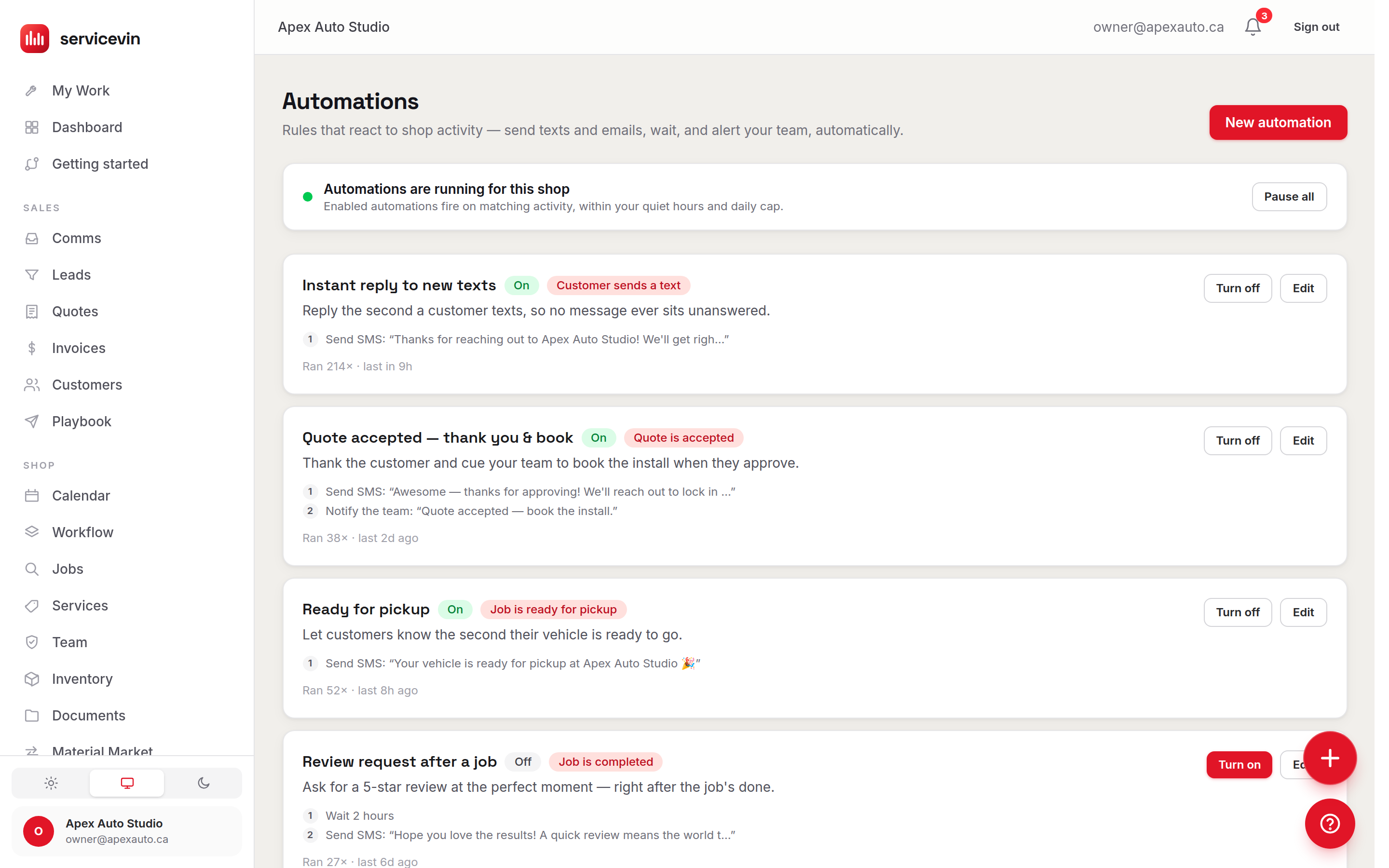
An automation you can't inspect is one you'll never trust with a customer. Each row names its trigger, lists the exact steps in order, shows the first line of the text it sends, and counts the times it has fired — with one switch to turn the whole shop's automations off.
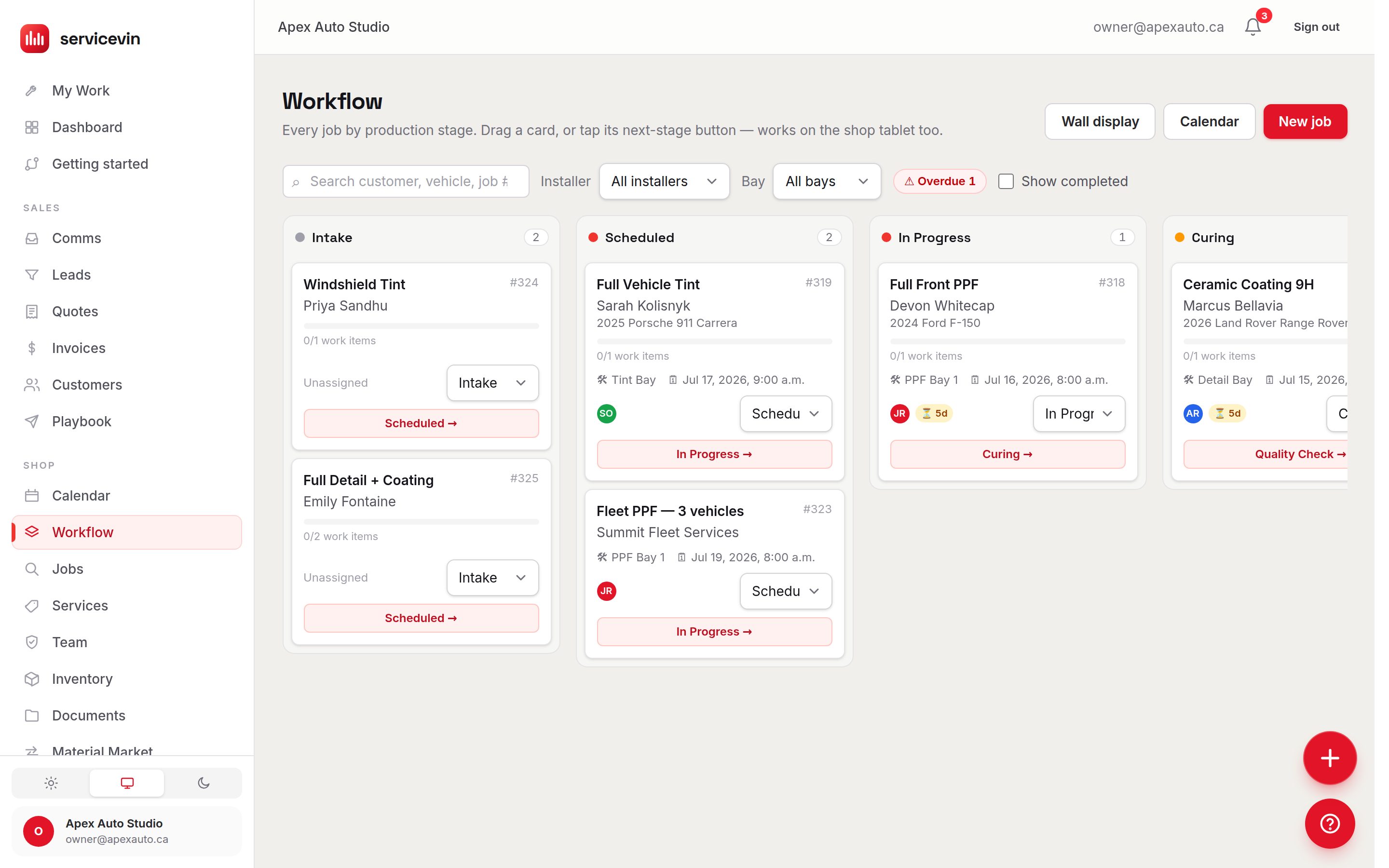
Moving a card is the trigger.
The job-stage triggers aren't a separate thing to maintain. When someone taps a job into the next stage on the board — scheduled, in progress, curing, ready — that is the event a workflow fires on, so the reminders and the “your vehicle is ready” text follow the work instead of somebody's memory.
Compose any workflow: trigger, rules, actions.
Start from a moment, add the conditions that matter to your shop, then chain the actions. No code and no per-task Zapier tax — it's built into the software that already runs your shop.
Triggers
The moment it starts
Conditions
Only when it fits
Actions
What happens next
75 triggers, conditions & actions — and the catalog grows with the product.
Automation you can actually trust.
Blast your list and you'll get your number flagged and your reputation dinged — I've watched it happen to good shops. Service VIN makes the safe thing the default: every automated message clears the same guardrails your best front-desk manager would enforce. These aren't settings you have to remember; they're on for every send.
Quiet hours
No texts land at 2am. Steps pause outside your send window and resume when customers are awake.
Opt-outs honored
STOP is respected instantly and permanently. Opted-out customers are filtered from every future send.
Marketing consent
Require consent before promotional messages when your rules — or your region's — call for it.
Per-customer cooldowns
A built-in cooldown and reactivation cap means no one gets nagged twice in a row.
Daily send caps
A per-shop daily ceiling stops a runaway automation from ever turning into a blast.
Full audit trail
Every trigger, decision and send is written to an append-only history you can review anytime.
- First replyIllustrative
- <60sHow fast a new lead hears back — any hourIllustrative target — your results depend on your list, offers and follow-through.
- Saved per weekIllustrative
- 12 hrsReminders & follow-ups that were manualIllustrative target — your results depend on your list, offers and follow-through.
- More reviewsIllustrative
- 3×When the ask is automatic and well-timedIllustrative target — your results depend on your list, offers and follow-through.
- Always onIllustrative
- 24/7Your shop follows up while you sleepIllustrative target — your results depend on your list, offers and follow-through.
Figures marked Illustrative show how the mechanism works. They are not measured averages of Service VIN customers, and nothing on this site claims a result for your shop.
AI Agents or Automations?
Both do work while you're mid-install, and they are not the same thing. One decides what to say; the other runs the journey you drew.
AI Agents
You want this when you want a specialist to read the situation and draft the right move — the quote that went quiet, the invoice that's overdue, the review that needs answering — in your shop's voice.
It does not run a fixed sequence you designed. Each agent decides case by case, and by default hands you the draft.
Automations
You are hereYou want this when you want the same journey to run the same way every time: this trigger, this wait, this condition, this text — no judgment calls, no surprises.
It does not improvise. A journey does exactly what you built, which is the point.
Questions, answered.
What is shop automation, exactly?
It's a set of workflows that watch for activity in your shop — a new lead, a finished job, an inbound text, a cold customer — and then take the follow-up action for you: send a text or email, wait, check a condition, or alert your team. You set the rules once and Service VIN runs them every time, so the follow-up that used to depend on someone remembering just happens.
How does automation help me convert more leads?
Speed and persistence. Service VIN texts a new lead back within seconds — day or night — assigns an advisor, and keeps nudging with reminders until they book or reply. In my experience the shop that answers first usually gets the job, so replying in under a minute instead of hours turns more inquiries into booked work without you touching your phone.
Can Service VIN follow up automatically after an install?
Yes. The moment a job is marked complete, it can send care and wash instructions, wait a couple of days, then ask for a review at the ideal time. It can also remind customers before a PPF or ceramic warranty check and tag your VIPs — all without anyone on the team lifting a finger.
Does it send both SMS and email?
Both, from your shop's own number and email address. You can mix channels inside one workflow — for example, text the reminder and email the care guide — and every message can use your shop's voice and branding.
Will this get my number flagged for spam?
That's exactly what the safeguards are built to prevent. Every automated send respects quiet hours, honors opt-outs instantly, enforces per-customer cooldowns, and stays under a daily cap — so an automation can never turn into a blast. Marketing consent can be required where your rules demand it, and every send is logged.
Do I need to be technical to build a workflow?
No. You pick a trigger, add your steps, and switch it on — no code, no integrations to wire up. Start from a ready-made journey like new-lead follow-up or post-install reviews, tweak the wording to sound like your shop, and you're live in minutes.
It doesn't work alone
Explore the rest of the shop
- FeatureCRM & LeadsEvery lead, conversation and follow-up in one working list — with win-back built in.
- FeatureCustomer managementVehicles, history, consent and tags for every customer you've ever worked with.
- FeatureLive-margin quotingQuote from real film-roll cost and watch your profit update live, line by line.
- FeatureAI AgentsA crew that chases every promise and never invents a price.
The follow-up that never happens, happening.
Try Service VIN free — no card required.
Turn on your first automation before your coffee's cold. Bring your customer list, set the rules once, and let your shop start following up on its own.
Free for 14 days, no card. Voice answering is a Command-plan beta; everything else here is on by default.