Quotes & Invoicing, from quote to paid — without the back-and-forth.
Build your quote from your real service and film-roll cost, see your profit margin before you hit send, then let the customer approve, add upgrades and put a deposit down — online, in a couple of taps. Every yes becomes an invoice and a job automatically.
- 14-day free trial
- No card required
- Live in minutes
Line items
Vehicle · SUV tierSTEK DYNOshield — full front
18.0 ft film · SUV tier
Ceramic-coat the film
Add-on service
Windshield protection film
1 each
Subtotal
CA$2,499
Tax (5%)
CA$125
Total
CA$2,624
One quote — priced, sent, approved and paid in the same system
Everything you need to close the sale — in one place.
From the first line item to the deposit that books the bay, Service VIN runs the whole sale — the same tools I use to quote and get paid in my own shop.
Accurate quotes
Build a quote line by line from your real services, per-vehicle price tiers and film SKUs — no more back-of-napkin pricing that eats your margin.
Margin aware
Watch Margin $ and Margin % update as you type, costed from the actual roll in your inventory. Know exactly what a job makes before you send it.
Margin on this quote58%Interactive optionsGrowth+
Offer pick-one package tiers and tickable add-ons — the customer's total, tax and deposit re-price live as they choose, and bundle savings like “10% off tint with any PPF” apply themselves.
A price list they read
A quote they configure
Sign & pay in one step
The customer picks their options, signs on screen and pays the deposit in one motion — secure Stripe checkout, right from the quote. No card details ever touch you.
Follow-ups & change requests
A quiet quote gets a nudge on its own, you see the moment it's opened, and a customer can send “request changes” notes that land right on the quote.
Quote → job
An approved quote becomes an invoice and drops a job on your board automatically — one source of truth, nothing re-typed.
Re-typed into three tools
One record, start to finish
Accurate quotes, built in minutes.
A quote is the most important sales document your shop sends. Service VIN makes it fast to build, honest about your margin, and effortless for the customer to say yes to.
Quote from real service and film-roll cost.
Stop guessing. Pull a service and its per-vehicle price tier, drop in the exact film SKU, and every line comes seeded with the price you charge and the cost you actually pay — so the number on the quote is a number you can stand behind.
- Services with good-better-best tiers, priced per vehicle type
- Film lines costed from the real roll in your inventory
- Per-line and quote-level discounts, tax handled correctly
- Reopen any draft and it re-prices to the right vehicle tier
Customer
Priya S. · Model Y
STEK DYNOshield — full front
18.0 ft · CA$1,650 · cost CA$612
Ceramic coating
1 each · CA$450
Sample dataSample data — an illustration of the screen, not a customer's account.
Know your profit before you hit send.
This is the part other quoting tools don't have. As you add lines and nudge prices, Service VIN shows Margin $ and Margin % in real time and colours it green, amber or red — so a thin job is obvious while you can still fix it, not after you've committed.
- Margin $ and Margin % update as you type
- Costed from actual roll cost, so it reflects reality
- Healthy / thin / losing-money read-out at a glance
- The server re-computes on save — the preview never lies
Sample dataSample data — an illustration of the screen, not a customer's account.
Text or email the quote, and see when they open it.
Send a clean, branded quote by SMS or email in one click. The customer opens a link — no login, no PDF wrangling — reviews it on their phone, and approves with a tap. You see the moment it's viewed and the moment it's approved.
- One-tap send by SMS, email, or both — from your shop's number
- Branded, mobile-first quote the customer can approve online
- “Viewed” lands on your dashboard the second they open it
- Downloadable PDF for the customer who wants one
Sent
to Priya · 9:04a
Viewed
opened on mobile · 9:12a
Approved
waiting…
Sample dataSample data — an illustration of the screen, not a customer's account.
What it looks like in the shop.
The mock-ups above isolate one moment each. These are the pages you'd be working in on a Tuesday.
The margin moves while you type
Every tool can print a total. This one prices the job against your real film cost and install time as you build it, so you find out a job is thin before you send it — not when you reconcile the month.
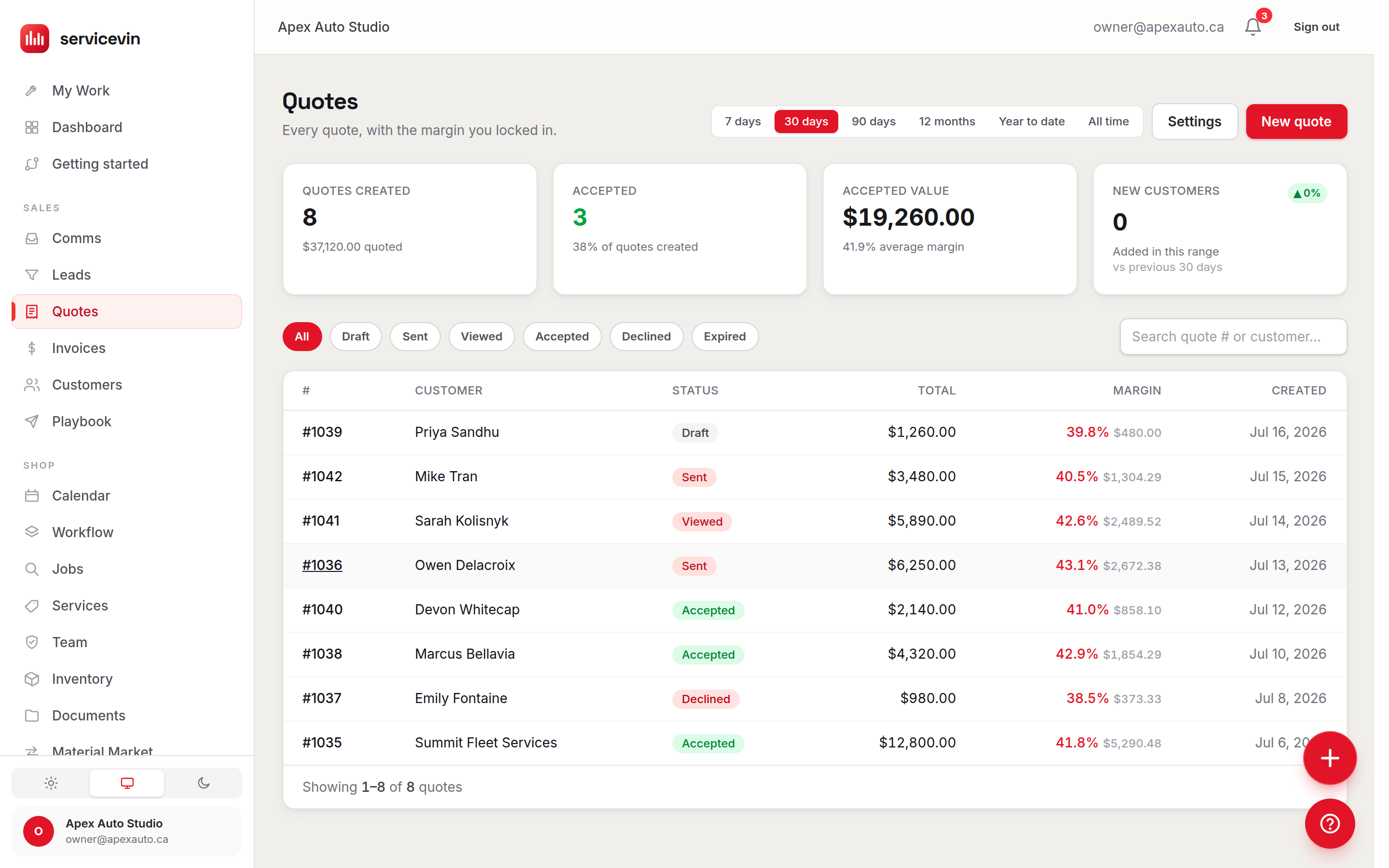
Every quote, with its margin in the list
Draft, sent, viewed, approved — and what each one makes — on one screen. The colour on a row is the same green / amber / red read-out you watched while you built it.
Work you offer, not work you bill
Every line can be billed, recommended or merely offered. The customer ticks what they want on their own screen and the total, the tax and the deposit all re-price — so the ticket grows without anyone making a phone call.
Growth and up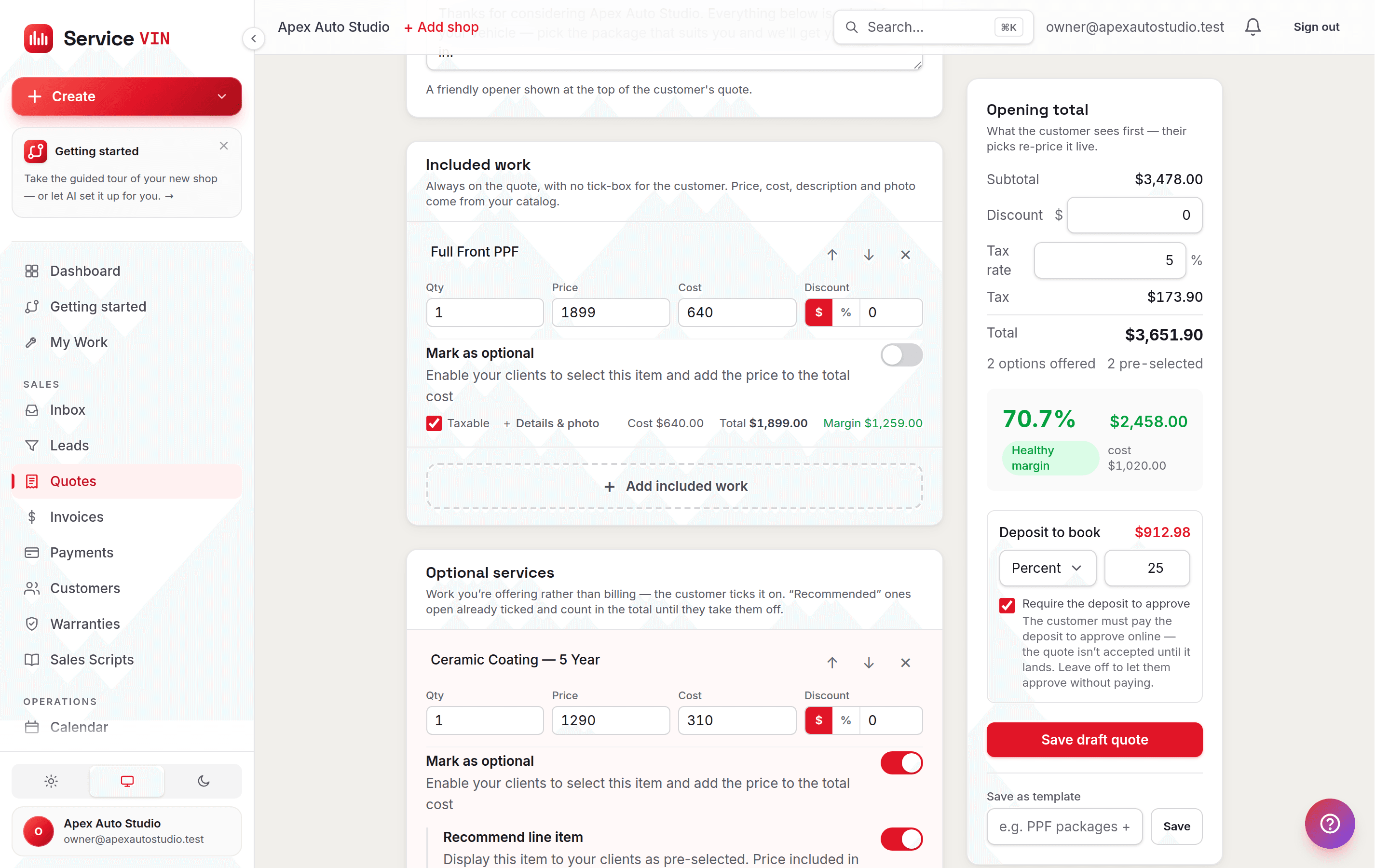
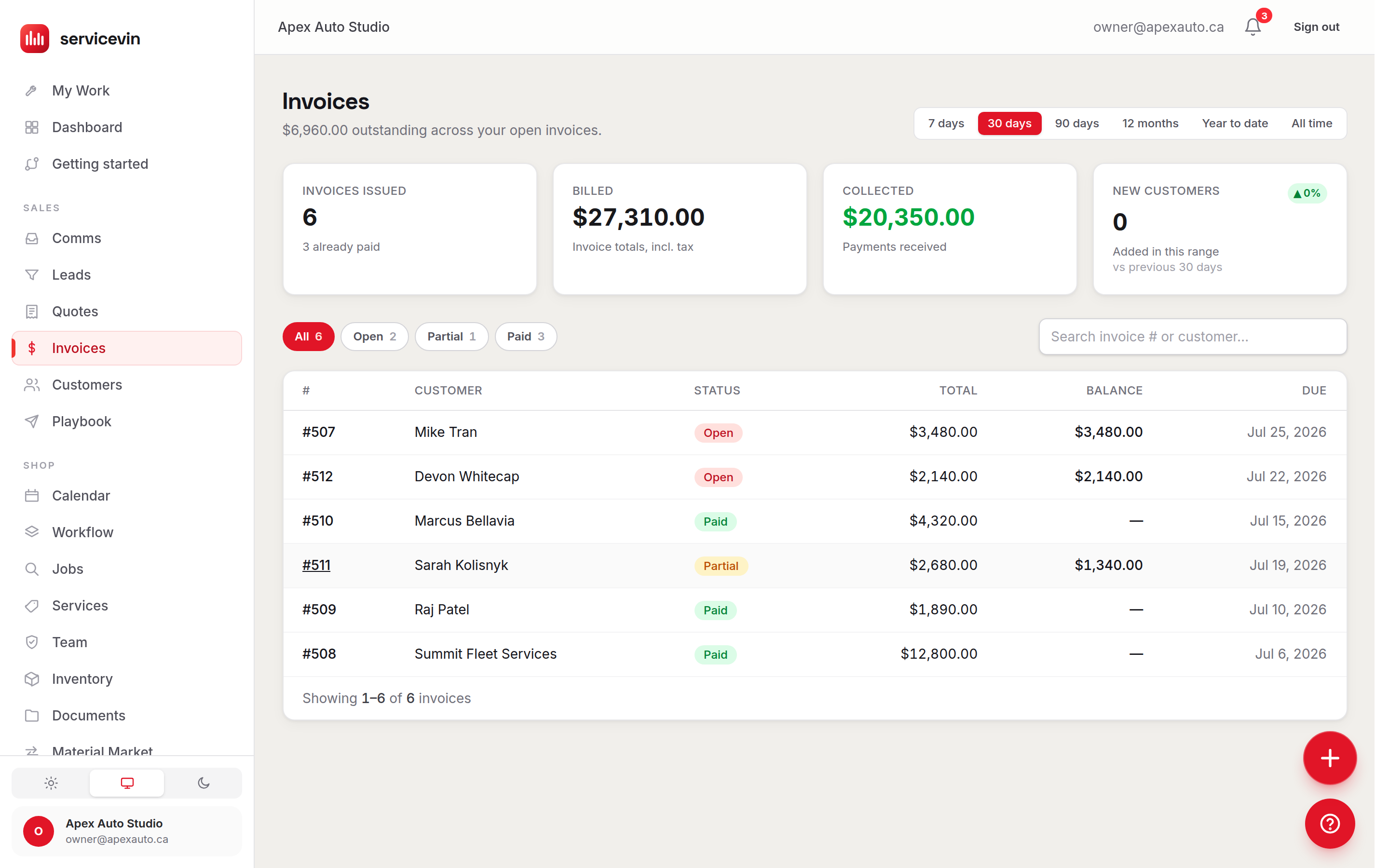
And the invoice it becomes
Approval writes the invoice. Deposit, amount paid and balance due are tracked straight through, so you always know who still owes you what.
Illustrative estimate — flat menu pricing hides thin jobs until after they're sent; live-margin quoting flags them while you can still fix the price.
| Item | Flat menu price (%) | Live-margin quoting (%) |
|---|---|---|
| Quotes | 30% | 5% |
A quote is only worth something once it's paid.
So Service VIN carries the sale all the way home. The customer approves, puts a deposit down through Stripe, and the job is booked — while the quote quietly becomes an invoice with the balance tracked to the cent. No separate invoicing tool, no copy-paste, no wondering who still owes you money.
Deposit to book
Require a deposit on approval, so the only people holding a slot on your calendar are the ones who've already put money down.
Pay online, securely
Customers pay by card through Stripe Checkout. You never touch card numbers, and the payment reconciles itself back to the invoice.
Auto-invoicing
An approved quote becomes an invoice with the same lines and totals — no re-keying, no drift between what you quoted and what you bill.
Balance tracking
Deposit, amount paid and balance due are tracked straight through. You always know who still owes you what.
Straight onto the board
The moment a quote is approved, a job is created and lands on your calendar — costed from the same margin math you already trust.
Nothing slips
Every send, view, approval and payment is logged. The whole money trail for a job lives in one place you can audit.
Recovery deskGrowth+
Every open balance rolled up per account, biggest first, each with a statement and a message drafted and ready to check. Built for the unpaid work that came across in your migration — the backlog no follow-up agent will ever touch.
Account statementsGrowth+
Draw a customer's whole open balance onto one document — every invoice, every payment applied, aged the same way your reports age it. Back-date it to any day for a fleet account that reconciles monthly.
Customer · Approve & book
A deposit is required to book this job.
Secured by Stripe · your card never touches the shop
Sample dataSample data — an illustration of the screen, not a customer's account.
Two plays that grow the ticket — right when they're saying yes.
Approval is the moment a customer is already reaching for their card. Service VIN puts two sales moves on the approval screen itself — so the average ticket grows on its own, and the ones about to walk get one last nudge.
Offer add-ons right when they approve.
Attach optional upgrades to any quote — ceramic on top of a wrap, windshield film with a PPF package, a wheel-face add-on. The customer ticks the ones they want on the approval screen, and the moment they approve, those lines are added to the real quote at the price you set. Bigger tickets, zero pressure, no phone call.
- Add-ons live on the approval page, priced and ready to tick
- Chosen upgrades become real line items the instant they approve
- Totals, tax and margin all re-compute on the server — no drift
- You set the offer once, on the quote; the customer does the rest
Make it even better
Ceramic coating on your PPF
Self-healing gloss + easier washes
Windshield protection film
Stop rock chips before they start
Wheel-face PPF (set of 4)
Curb-rash protection
Sample dataSample data — an illustration of the screen, not a customer's account.
One last play.
A customer about to walk is worth one more move. Arm a quote with The Last Offer — a one-time incentive that only appears if they go to decline. Instead of losing the job, they see a limited discount and a clear picture of what they'd save. Accept, and the discount applies and the quote books itself. It's the difference between a dead quote and a booked bay.
- Fires only on the decline click — never shown by default
- A time-boxed discount with the savings shown front and center
- Accept and it applies the discount and approves in one step
- Turn it on per quote — you decide which jobs get the nudge
A special offer, just for today.
Book this job now and take 10% off your full-front PPF package.
You save
CA$262
Sample dataSample data — an illustration of the screen, not a customer's account.
Quote to paid in three moves.
- 1
Build & price it
Pick services, tiers and film. Watch your margin update live, add optional upgrades, and set a deposit — all in a couple of minutes. - 2
Send & they approve
Text or email a branded link. The customer reviews on their phone, adds any upgrades, and approves — or meets The Last Offer. - 3
Deposit, invoice, job
They pay a deposit through Stripe, the quote becomes an invoice, and the job lands on your board — automatically.
- Margin on every quoteIllustrative
- LiveSee profit before you send, not after
- To approveIllustrative
- 1 tapNo login, no PDF — right on their phone
- Bigger ticketsIllustrative
- +$Upsells that add themselves at approval
- Tools to reconcileIllustrative
- 0Quote, invoice and job are one record
Figures marked Illustrative show how the mechanism works. They are not measured averages of Service VIN customers, and nothing on this site claims a result for your shop.
Every quote is costed from your real inventory — your results depend on your pricing, offers and follow-through.
Vehicles or flat glass?
Both are quotes in the same system, off the same rolls. What differs is how you build them.
Quotes & Invoicing
You are hereYou want this when you are quoting work on a vehicle — services, per-vehicle price tiers and film SKUs, with live margin as you build.
It does not measure openings for you; flat glass is quoted by the square foot on its own screen.
Architectural Film
You want this when you are quoting flat glass by the square foot — residential or commercial openings, off the same rolls.
It does not live somewhere else. It lands in the same quotes list, portal, invoice and job.
Questions, answered.
How are quotes priced — do I have to type every number?
No. You set up your services with per-vehicle price tiers and your film SKUs with their real cost once. After that, adding a line seeds the price you charge and the cost you pay automatically. You can still override anything per line, add a discount, or drop in a free-form custom line — but the fast path is a few clicks, not a spreadsheet.
What makes the live-margin quoting different?
Most quoting tools only show the customer-facing total. Service VIN also shows you Margin $ and Margin % as you build, costed from the actual film roll in your inventory — and colours it green, amber or red so a thin job is obvious before you send it. The server re-computes the same math on save, so the number you watched is exactly the number that gets stored.
Can customers approve and pay online?
Yes. You text or email a branded link — no login required. The customer reviews the quote on their phone, approves with a tap, and can pay a deposit (or the balance) through secure Stripe Checkout. You never handle card details, and the payment reconciles itself back to the invoice.
How do the add-on upgrades work?
When you build a quote you can attach optional upgrades — say ceramic on top of a wrap, or windshield film with a PPF package. They show up on the customer's approval screen as tickable add-ons at the price you set. When the customer approves, the ones they chose are added to the real quote as line items and the totals, tax and margin all re-compute on the server. It's a hands-off way to grow the average ticket right when intent is highest.
What is The Last Offer?
It's a one-time close you can arm on any quote. It stays hidden unless the customer goes to decline — at that moment they're shown a limited-time discount and exactly what they'd save. If they accept, the discount is applied and the quote is approved in one step. You turn it on per quote, so you decide which jobs are worth the extra nudge.
Does an approved quote become an invoice and a job?
Yes — that's the whole point of keeping it in one system. Approval fans out to an invoice with the same lines and totals and drops a job onto your board, costed from the same margin math. Nothing is re-typed, and there's no drift between what you quoted, what you billed and what you're building.
What happens to a quote that goes quiet?
You'll see when a customer opens it, and quotes that sit unaccepted can trigger an automatic follow-up so they don't just rot in an inbox. A quote also carries a valid-until date, and if it lapses you can extend it in a click and send it again rather than rebuilding it.
It doesn't work alone
The rest of the sale lives here
- FeatureOnline bookingsA branded storefront that takes bookings and deposits 24/7 — every one becomes a quote and a job.
- FeatureInventory ManagementThe shelf behind these quotes — every roll at real cost, reorder alerts, and material COGS on every job.
- FeatureCRM & LeadsEvery lead, conversation and follow-up in one working list — with AI win-back built in.
- FeatureAutomationsPut your quote follow-ups, reminders and review requests on autopilot — with quiet hours and opt-outs handled.
Quote it, close it, get paid for it — in one place.
Try Service VIN free — no card required.
Send your next quote with the margin baked in, a deposit link attached, and a close that grows the ticket on its own. Flat monthly pricing — Essentials $79, Growth $199 and Command $399 — with no per-quote or per-transaction fees.
Free for 14 days, no card. Import your price list and quote a real job today.