A calendar built for the way your shop books.
Drag-and-drop scheduling, jobs color-coded by service, one-click booking straight from the grid, events and time off beside the work, and a map view for mobile detailers — synced with Google Calendar, both ways.
- Month, week & map views
- Drag-and-drop rescheduling
- Color-coded by service
- Events & time off inline
Mon 6
Tue 7
Wed 8
Thu 9
Every booking in one connected calendar.
Jobs, events, days off and mobile routes — the calendar is the shop's single source of what happens when, and it's wired to the same records as your quotes, jobs and invoices. Every booking carries its live-margin quote, and the same job events feed the AI team's install reminders and win-backs.
Drag & drop
Reschedule in one drag — the chip keeps its time-of-day and duration, the change saves instantly, and it reverts with a reason if the slot can't take it.
Call the installer, erase the whiteboard, re-write the row
One drag — saved, logged, synced
Color-coded
Bookings take the color of their service category — PPF, tint, wrap, coating, detail — so a glance tells you what the week is made of. Your custom categories get stable colors too.
Book in one click
Click any empty slot and the booking form opens with that day and time already filled. Customer, vehicle, bay, installer — done.
Open the booking form, then type the date and the time
Click the slot — the form opens already on Tue 9:30
Events & time off
Meetings, supplier visits, installer time off and shop holidays live beside the bookings — for the whole shop or one installer, timed or all-day.
Google Calendar sync
Two-way: bookings push to your Google Calendar, and a reschedule made in Google folds back onto the job. Refreshed every 15 minutes, or on demand. In beta, and included from Growth up.
Map view
Mobile jobs become numbered stops on a day map with drive distances, a route-order suggestion, and one-tap navigation to each address.
See the whole shop's week at a glance.
Color-coded by the service categories you already run — PPF blue, tint violet, wrap pink — with events and time off unmistakably not-work. A gray wall of identical appointments is how you double-book Bay 1; this is how you don't.
A drag-and-drop calendar that's fully customizable.
Month for the overview, week for the plan, map for the road. Filter to one installer or one bay, toggle events on and off, and drag any booking to its new slot — the move keeps the job's duration, saves optimistically, and lands on the job's timeline as a real audit entry. Everything renders in the shop's timezone, so checking the board from a trade show can't shift your week.
- Month, week and map views of the same schedule
- Filter by installer or bay; legend keeps colors readable
- Drag to reschedule — duration and time-of-day preserved
- Every move logged on the job's activity timeline
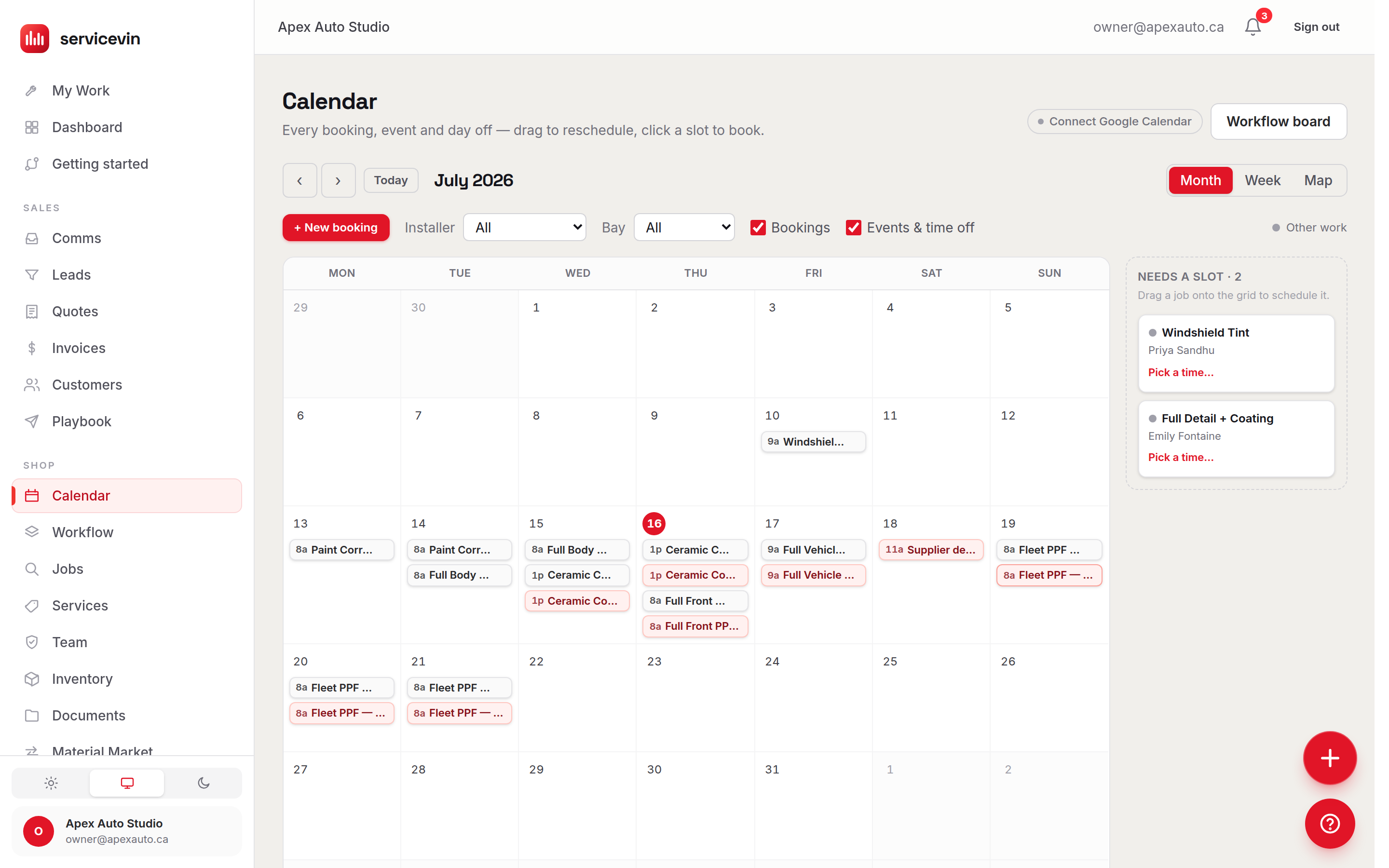
The bay can't be double-booked.
Color tells you what the week is made of; the database makes sure it can actually happen. Booking two jobs into the same bay at the same time isn't a soft warning you can miss — the calendar rejects the move at the database level, snaps the chip back, and tells you why. Unscheduled work waits in a tray at the edge of the grid until you drag it into a real slot.
- Bay conflicts blocked by a database constraint, not a popup
- Rejected drags revert instantly with the reason
- Unscheduled jobs queue in a tray — drag one onto the grid to book it
- Rush jobs carry their flag onto the calendar
Wed 8
Thu 9
Needs a slot · 2
Sample dataSample data — an illustration of the screen, not a customer's account.
Illustrative estimate — a single shared calendar removes the clashes a paper board invites.
| Item | Shared paper calendar (/mo) | One calendar (/mo) |
|---|---|---|
| Clashes | 6/mo | 0/mo |
Add a booking right from the calendar.
Create a new booking in seconds without leaving the grid: click the slot, pick the customer, done. Cross-reference details inline, set events, appointments and days off in the same click, and manage every kind of entry in one place — nothing lives in a second system.
Tue Jul 7 · 9:30
What goes here?
+ New booking
Form opens prefilled → Tue 9:30–11:30
+ Event, meeting or time off
Blocks time without creating a job
- Customer
- Priya Sharma
- Vehicle
- 2023 Model Y
- From quote
- #1043 · services attach as work items
- Where
- 🏭 In shop · PPF Bay 1
Prefilled from the grid
Click a slot and the form opens with that day and time set. Pick the customer and you're booked — bay, installer and services optional.
Cross-referenced inline
The booking carries its customer, vehicle, quote and services — so the chip on the grid links straight through to the whole job record.
Days off & holidays
Block a stat holiday for the shop or book one installer's week away. All-day or timed, and installer availability shows up alongside.
The tray catches strays
Accepted work with no slot yet waits in the unscheduled tray at the edge of the calendar. Drag it in when a bay opens up.
Tablet-proof
Every chip has a dialog fallback with plain time pickers — the reliable path on a shop-floor tablet where drag-and-drop won't fire.
Storefront feeds it
Online bookings from your branded storefront become real jobs on this same calendar — deposits taken, customer records created.
A map view built for mobile detailers.
Off-site day? Flip the calendar to Map and the schedule becomes a route: numbered stops, drive distances, and turn-by-turn navigation to each job.
Less drive time, more jobs.
Mark a booking as mobile with a service address — prefilled from the customer's record — and it becomes a stop on the day's map. Service VIN plots the booked order, measures it, and suggests a tighter running order when one exists, with the kilometres saved spelled out. You stay in charge: drag bookings on the calendar to re-order the day, then send the whole route to Google Maps in one tap.
- Map view of every off-site booking, numbered in booked order
- Turn-by-turn navigation to each stop — works from the address alone
- Route-order suggestions with the drive-distance savings shown
- One link opens the whole day as directions in Google Maps
Suggested order 1 → 3 → 2 → 4 saves ≈ 7 km of driving.
Sample dataSample data — an illustration of the screen, not a customer's account.
Google Calendar, both ways.
Most tools push and call it a sync. Service VIN pushes your bookings to Google Calendar and pulls reschedules back — so the calendar on your phone and the calendar running your shop can't drift apart. The connector is in beta and included from Growth up.
Your schedule, wherever you already look.
Connect your shop's Google account in Settings → Integrations and every scheduled booking appears on your Google Calendar — updated when it moves, never duplicated on a re-run. Nudge an event on your phone and the change folds back onto the Service VIN job within the sync window. The calendar header shows the live connection state, and a Sync now button forces a pass any time.
- Push: scheduled bookings appear and update in Google Calendar
- Pull: reschedules made in Google fold back onto the job
- Runs every 15 minutes — plus a Sync now button
- Connection status right on the calendar header
Google Calendar
[email protected] · primary
Job #214 “Model 3 — full front” created in Google Calendar
10:00 · Service VIN → Google
Job #209 rescheduled Wed 9:00 → Thu 9:00 · event updated, not duplicated
10:00 · Service VIN → Google
“F-150 — hood + fenders” nudged to 1:00p on your phone → job updated
10:15 · Google → Service VIN
Job #216 canceled → event removed
10:15 · Service VIN → Google
Sample dataSample data — an illustration of the screen, not a customer's account.
Booked to rolling in three moves.
- 1
Book it
Click a slot, from a quote, or let your online storefront book it for you — every job lands on the calendar with its customer and vehicle attached. - 2
Run the week
Drag to reschedule, block time off, and trust the bay guard to keep the plan physically possible. Filters keep a busy grid readable. - 3
Hit the road
Mobile days flip to a map with numbered stops, a route suggestion and navigation — while Google Calendar keeps everyone in the loop.
- To reschedule anything
- 1 dragSaved instantly, logged on the job, synced to Google
- Double-booked bays
- 0Blocked by a database constraint — not a warning you can miss
- Google Calendar sync
- 2-wayPush and pull on a 15-minute cadence, or on demand
- Online bookings land here
- 24/7Your storefront books straight into the same grid
Online Bookings, the calendar, or AI Scheduling?
Three pages on this site are about the same booking, at three different moments. Here is the honest split.
Online Bookings
You want this when you want a customer to book themselves, from your storefront, at 11pm, without anyone answering the phone.
It does not run your shop's day. It is the front door, not the board.
Calendar & Booking
You are hereYou want this when you want one board your whole shop works from — every bay, every installer, every event and day off, for the week you are actually running.
It does not take the booking from the customer, and it does not choose the slot for you.
AI Scheduling
You want this when you want the openings you offer to be ranked, so the slot a customer is shown is the one that is worth the most to the shop.
It does not replace the calendar. It decides which opening to offer; the calendar is where the job then lives.
Questions, answered.
What is the Service VIN calendar?
An interactive drag-and-drop calendar built for wrap, PPF, tint, ceramic and detailing shops. Bookings are color-coded by your own service categories, events and time off sit beside the work, and every entry is connected to the rest of Service VIN — the chip on the grid is the same record as the job, its quote and its invoice. Month, week and map views cover the office, the floor and the road.
Does it sync with Google Calendar?
Yes — in both directions, and it's in beta and included from Growth up. Connect your shop's Google account and scheduled bookings push to your Google Calendar (updated on reschedule, never duplicated), while changes made in Google pull back onto the matching Service VIN job. The sync runs about every 15 minutes, there's a Sync now button for immediacy, and the connection status is shown right on the calendar header.
Can I book directly from the calendar?
Absolutely. Click any empty slot and choose New booking — the form opens with that day and time prefilled, so it's pick-a-customer-and-save. The same click can add an event, internal meeting, installer time off or a shop holiday without creating a job. Unscheduled jobs wait in a tray beside the grid; drag one in to book it.
Does it work for mobile detailers?
Yes. Mark a booking as mobile with a service address (prefilled from the customer's record) and the day's Map view shows every off-site stop numbered in order, with approximate drive distances between them, a suggested running order when it would save kilometres, turn-by-turn navigation per stop, and a one-tap link that opens the entire day as directions in Google Maps.
What stops me from double-booking a bay?
The database itself. Each single-capacity bay carries an exclusion constraint on its booked time ranges, so two overlapping bookings physically can't be saved — whether the attempt comes from a drag, the booking form, or an integration. The calendar shows the rejected chip snapping back with the reason. Warnings can be missed; constraints can't.
How do events and time off work?
The calendar holds four kinds of non-job entries: events (consults, supplier visits), internal meetings, installer time off and shop holidays. Each can be timed or all-day, for the whole shop or one installer. Time off booked in an installer's availability settings shows up on the calendar automatically, so the two can't disagree.
What happens when my online storefront takes a booking?
It lands on this calendar as a real job — Service VIN's online booking storefront creates the customer record, takes the deposit, and schedules the job into the same grid your team runs the day from. No import, no second calendar to reconcile.
It doesn't work alone
What fills this calendar, and what runs off it
- FeatureOnline BookingsA branded storefront that takes bookings and deposits 24/7 — every one becomes a customer and a job on this calendar.
- FeatureCRM & LeadsThe pipeline that fills the calendar: vehicle-aware leads, a unified SMS inbox, and one-click lead-to-quote.
- FeatureAutomationsBooking reminders, day-before texts and review requests — triggered by the same job events the calendar writes.
- FeatureDispatch & RoutesThe mobile day once it leaves the board and hits the road.
A booked bay is the only marketing metric that pays a bill.
Try Service VIN free — no card required.
The whole product's on during your trial — no card down. Put this week on the calendar, drag it into shape, and let Google Calendar keep the crew current.
Free for 14 days, no card. Your booking page can be live this afternoon.