Meet the AI crew
A tour of the AI Agents page: the eleven specialists, what each badge means, and where their real stats and activity live.
AI & automations13 in this section
The AI Agents page is the control center for your specialist crew — set each one up once, then let it work. Every card on the roster deep-links to that agent's own page (for example /agents/win-back), where you'll find its on/off switch, its tunable settings, and a Before it can run checklist of prerequisites. Above the roster sit the shared shop voice, real stats, and — when any draft-first agent has messages waiting — the Approvals queue.
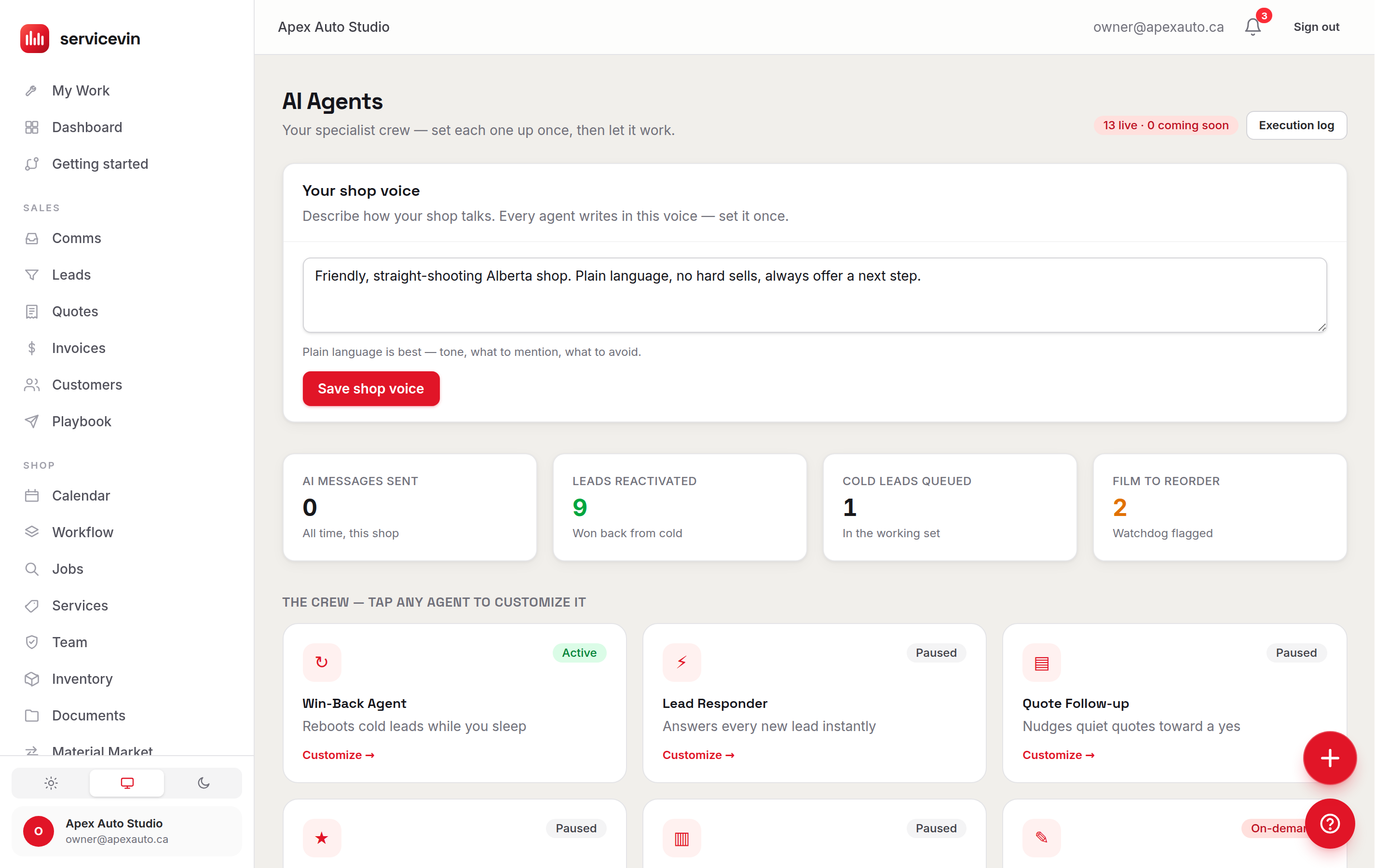
The roster
Looking for the Quote Follow-up, Review Requester, Install Reminder or Missed-Call Responder?
They're Automations now — same jobs, one place. A rule fires on the same moment the agent used to watch for (a quiet quote, a finished job, an upcoming appointment, a missed call), and because it is a rule you can read the exact words before you switch it on, change them without asking anyone, and see every run in one log. The Lead Responder is not one of them and is still an agent: it reads what the lead actually wrote and researches the vehicle before answering, which fixed wording can't do. Call forwarding — the phone that rings before a call counts as missed — moved to Settings → Phone numbers, and the after-hours auto-reply lives on Settings → Messaging.
What each badge means
Every agent's own page has four tabs. *Configure* holds the switches and send windows. *Prompt* is what it says — the always-on rules nobody can switch off, and, underneath them, the wording that is yours to change (Tell your agent what to say). *Knowledge* is what it may look up before it writes — your service prices, your hours, your deposit rule, your Shop Memory, the customer's own record, and notes only this agent reads (Give your agent a knowledge base). *Activity* is what it has actually done. Wording problems live on Prompt; wrong facts live on Knowledge. The Invoice Chaser sends a message you wrote rather than one an AI writes, so both of its tabs say so and point you at the template instead.
The four stat tiles are real rows the agents wrote — AI messages sent (all time), leads reactivated, cold leads queued, and film flagged for reorder. Below the roster, Recent agent activity lists the latest texts your agents generated, newest first, each with its delivery status (queued, sent, delivered, or failed) straight from the carrier.
Running a promo? Use the Campaign Runner.
On its page, name the campaign, pick an audience segment (each shows a live contact count), and describe the offer. The agent writes each text individually in your shop voice, adds an opt-out line, and only launches inside your send window.
Troubleshooting
Every SMS agent shows “Needs setup” even though it's switched on.
Why: The messaging rail isn't live: Twilio isn't connected, no number is provisioned, or the Automated-messaging toggle is off (it stays off until A2P approval).
Fix: Finish the checklist in Settings → Messaging — each agent's “Before it can run” card shows exactly which item is missing.
I changed a setting but the agent kept its old behaviour.
Why: Settings apply on the agent's next run, not retroactively to work already queued.
Fix: Wait for the next cycle — the green “Saved” banner confirms the change took; nothing else is needed.
Common questions
Which agents work before I set up Twilio?
The on-demand pair: the Message Composer (drafts in your inbox) and the Reorder Watchdog (watches stock and emails alerts). Dash, the copilot, also needs no Twilio. Everything that texts or answers calls needs the messaging rail first.
Can an agent text a customer in the middle of the night?
No. Every automated sender respects the shop's send window and daily caps, and opt-outs are always honored — the Win-Back Agent's quiet-hours knobs set the window.
Who can change agent settings?
Only owners and managers (the shop.manage permission). Everyone else sees the pages read-only.