Inventory: film by the foot, at real cost
SKUs, physical rolls and remnants — with shelf valuation at what you actually paid, 30-day usage, reorder flags, and draw-downs that cost jobs honestly.
Shop operations11 in this section
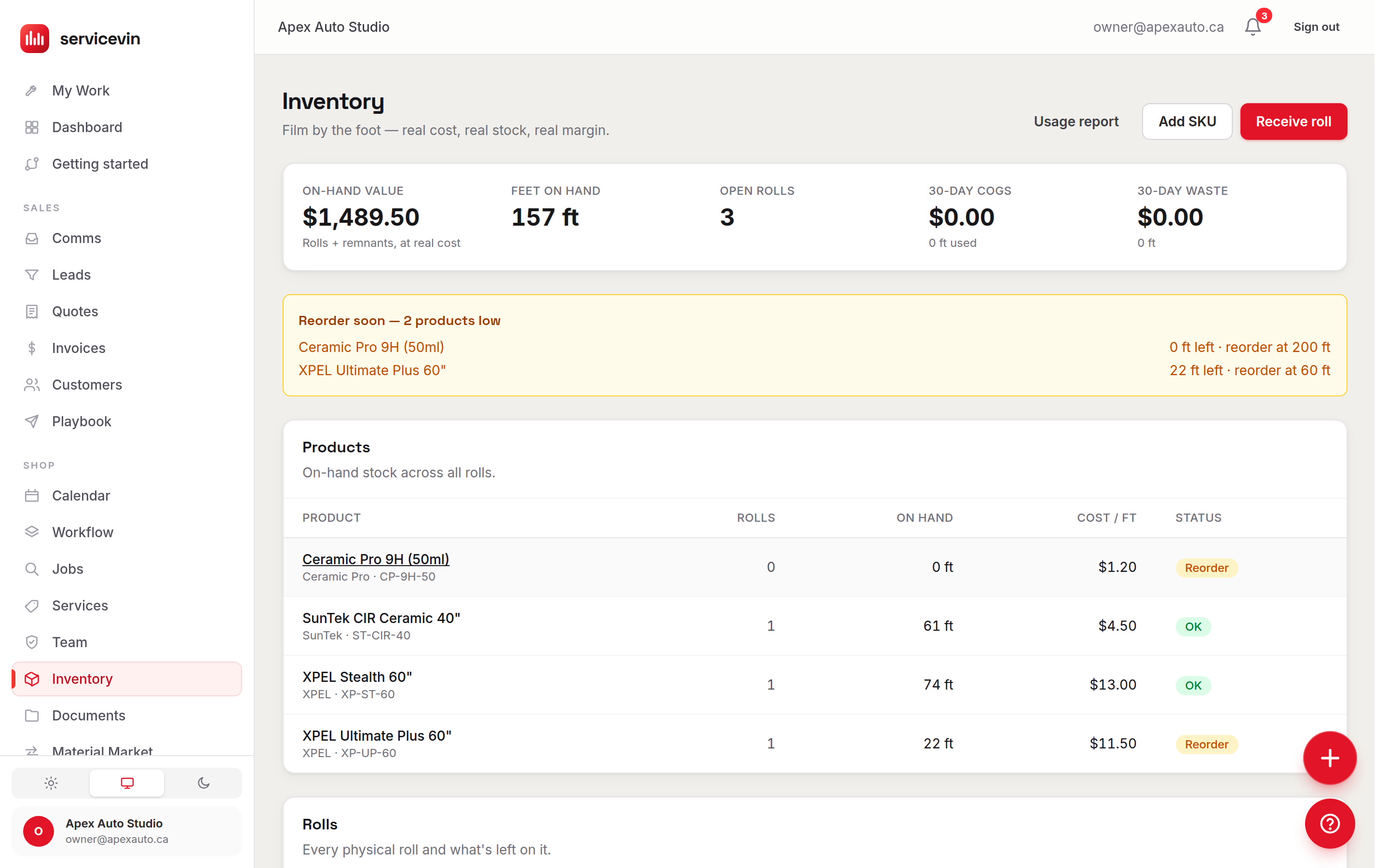
Inventory tracks film three ways: SKUs (the products you stock), rolls (each physical roll, with what's left on it), and remnants (offcuts still worth money). The header stats give your material position at a glance — on-hand value, feet on hand, open rolls, 30-day COGS and 30-day waste. Valuation is computed from the rolls themselves: remaining feet × that roll's real cost per foot, not the SKU's default, so the number matches what you actually paid.
The lifecycle of a foot of film
- 1
Receive the roll
Receive roll logs a new physical roll against a SKU with its length and the price you paid — that cost per foot follows the roll for life.
- 2
Draw it down against jobs
As you cut, open the roll and log the feet used with the job selected. Stock drops, and the footage lands on the job's Materials used panel at the roll's real cost — that's the job's true COGS.
- 3
Shelf the offcut
Log a draw-down with reason Remnant cut and the offcut appears in the Remnants table, still carrying its cost. Use it before opening a fresh roll, then Mark used or Scrap it.
Set a reorder threshold on each SKU and the page grows an amber "Reorder soon" banner whenever total remaining feet fall below it — the same signal the Reorder Watchdog agent uses to alert you before you run dry mid-install. The Usage report breaks the last 30 days down by product, job and waste.
Tip
Waste is tracked on purpose: draw-downs logged as waste roll into the 30-day waste stat. Watching it per product is the fastest way to spot a film that fights you — or a pattern worth a training conversation. Ask Dash "what did we waste the most of this month?" any time.
Troubleshooting
On-hand value doesn't equal feet × the SKU's cost per foot.
Why: By design — valuation uses each roll's actual purchase cost, and different rolls of the same SKU often cost different amounts.
Fix: Nothing to fix. The SKU's default cost is only a prefill for receiving; the shelf number reflects reality.
A product is nearly gone but never shows a reorder flag.
Why: The SKU has no reorder threshold set.
Fix: Open the SKU and set the threshold in feet — the banner, the row badge and the Reorder Watchdog all key off it.
An offcut I cut never appeared under Remnants.
Why: The draw-down wasn't logged with the Remnant cut reason — only that reason shelves the offcut.
Fix: Log remnant-producing cuts with the Remnant cut reason; the offcut lands in the table with its size and value.
Common questions
How does inventory affect job margins?
Every draw-down logged against a job carries its roll's real cost onto that job's Materials panel as COGS — so job and report margins reflect what the film actually cost, not a list price.
Can I sell film I'll never use?
Yes — list excess rolls on the Film Exchange and sell them to other shops on the network.