Every install photo and warranty, filed where the work lives.
The Document Portal pulls install photos, warranty PDFs, contracts and walk-around videos into one library — tagged and filed to the right customer, vehicle and job.
- 14-day free trial
- No card required
- Drag-and-drop your first files in minutes
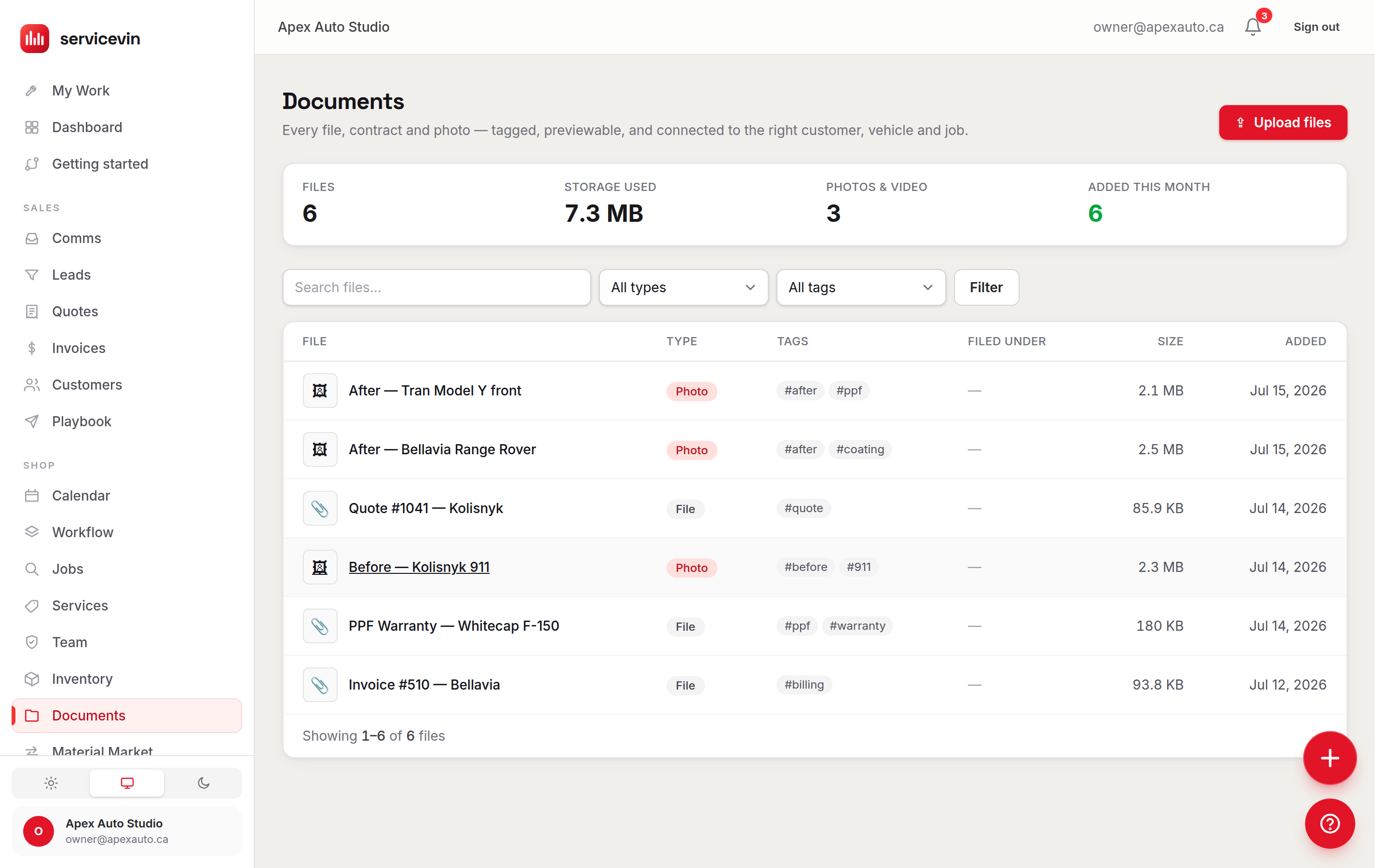
Every file, contract and photo in one place.
Wrap work runs on evidence — the intake photos that protect you, the warranty the customer asks for a year later, the contract that settles a dispute. Here's what the portal handles out of the box.
Job-linked files
File any document under a customer, vehicle, job, quote or invoice — it then surfaces right on that record, where the work happens.
Client sharing
Send warranties, care instructions and photo sets by text or email as secure links that expire on their own and revoke in one click.
Emailing the file as an attachment
A link that expires and revokes
Inline previews
Open PDFs, photos and video right in Service VIN — no downloads. Every open of a customer link is logged, so you know it landed.
Secure storage
Files live in a private bucket with no public URLs — every view is a short-lived signed link, and every shop's files are fully isolated.
Photos & video
Before, during and after shots plus walk-around video up to 200 MB per file, uploaded straight from the bay on any phone.
Smart tagging
Batch-tag uploads and find any document in seconds — search by name, filter by type, or click a tag anywhere in the library.
Scrolling a camera roll
#warranty · 3 results
Your shop's paperwork, finally organized.
Stop losing proof in camera rolls and text threads. Everything lands in one tagged, searchable library that belongs to the shop — not to whoever's phone shot it.
Upload and store all business documents.
Photos, videos, contracts, PDFs and proposals — drag them in (or browse from any phone in the bay) and they land in your shop's private library. Uploads go straight to storage, so a 200 MB walk-around video moves as fast as your connection allows, and every file is verified before it's recorded.
- Drag-and-drop, multi-file uploads — up to 20 at a time
- High-res images, video up to 200 MB, PDFs and docs
- Batch tagging: one tag set applied to the whole upload
- File the batch under a customer, vehicle or job as it lands
Drop files here — photos, video, PDFs
Up to 20 files · 200 MB each
Tags for this batch
File under
Job #1042 · Model Y full front
Find any document in seconds.
A library only helps if you can get back out of it. Every file carries a type (photo, video, PDF, contract, signature) and your own tags. Search by name, filter by type or tag, and click any tag anywhere to pull up its set — the warranty from last spring is three keystrokes away, not thirty minutes of scrolling.
The same file, wherever you need it.
Documents aren't a silo. Because files attach to real records, they surface on the customer, the vehicle, the job, the quote and the invoice — the library is just the view of everything at once.
Open the customer, see their paper trail.
Every customer page carries a Files card: the warranty you registered, the contract they signed, the delivery photos from the last job. When a customer calls a year later about a warranty claim, the answer is one click deep — and “Add files” pre-files the upload under that customer so nothing lands loose.
- Files card on customer and job pages, out of the box
- Uploads started from a record are pre-filed to it
- One file can be filed under several records at once
- Unfiling never deletes — the file stays in the library
Priya Sharma
2023 Tesla Model Y · CA$4,850 lifetime
Files
Add filesVisual proof for every job.
Techs shoot intake, progress and delivery photos from the bay — grouped before / in progress / after on the job itself, with contracts and release forms alongside. The next dispute about a pre-existing scratch is settled by your intake photo set, timestamped and filed where the job lives.
- Before / in-progress / after photo groups on the job page
- Any team member can upload — sharing stays owner-gated
- Contracts and releases sit next to the work, not a drive
- Every upload is stamped with who added it and when
Photo documentation
Before · 4
In progress · 3
After · 6
From camera roll chaos to filed-and-shared in three moves.
- 1
Upload
Drag files in from the desk or shoot them straight from the bay — photos, video, PDFs and contracts up to 200 MB each. - 2
Tag & file
Batch-tag the set and file it under the customer, vehicle or job it belongs to. It now surfaces on that record, forever findable. - 3
Share
Text or email a secure, expiring link. The customer previews it in one tap, you see the open, and you can revoke it any time.
Customer Portal or Document Portal?
Both end in something a customer opens on their phone, and they are not the same thing. Here is the plain split.
Customer Portal
You want this when you want the customer to follow their own job — read and approve the quote, sign it, pay the invoice, see where the car is up to.
It does not hold your photo library, and it isn't where contracts and warranties are filed.
Document Portal
You are hereYou want this when you want the files themselves — install photos, contracts, warranties — filed against the customer, the vehicle and the job, and sent as a link that expires.
It does not show a customer their quote, invoice or job status; that is the customer portal.
- Library for the whole shop
- 1Not five camera rolls and a drive nobody can search
- Per file, straight to storage
- 200 MB4K walk-around video uploads without touching email
- Links expire on their own
- 30 daysAnd revoke instantly — nothing stays public forever
- Logged on the link
- Every openYou know the customer got the warranty, not hope so
Storage is included with Service VIN — no third-party drive, no extra subscription, no per-file fees.
Questions, answered.
What is the Document Portal in Service VIN?
It's a centralized file library built into your shop software: upload, tag, preview and store business documents — install photos, videos, PDFs, contracts and proposals — with every file connected to the customers, vehicles, jobs, quotes and invoices it belongs to. Because it lives inside Service VIN, the warranty sits next to the invoice it covers and the photos sit on the job they document.
Can I store installation photos and job documentation?
Yes — that's the core of it. Techs upload photos and video straight from the bay; job photos group into before / in progress / after on the job page, and anything else (release forms, contracts, care sheets) files alongside. Files up to 200 MB each upload directly to storage, so even 4K video clips work.
Is the Document Portal secure?
Files live in a private storage bucket with no public URLs — every view, even your own in the dashboard, runs through a short-lived signed link minted only after the system confirms you're allowed to see that file. Shops are fully isolated from each other at the database level, uploading is open to your team while sharing and deleting are owner-gated, and every action lands on the file's audit trail.
Can customers access their own documents?
You share exactly what you choose: any file can be sent as a secure link by text or email — the same delivery rail as quotes and invoices, with opt-outs respected. The customer opens a clean read-only page with your shop's name on it, no login needed. Links expire after 30 days, can be revoked in one click, and record every open so you know it arrived.
How does tagging work?
Type tags once at upload — “warranty, ppf, before” — and they apply to the whole batch. Tags become one-click filters across the library, alongside type filters (photo, video, PDF, contract, signature) and name search. You can retag any file later, and the library's tag list builds itself from what your shop actually uses.
What happens when I delete a file?
Deleting removes the stored file, unfiles it from every record, and instantly revokes every live customer link to it — nothing stays reachable. Deletion is owner-gated, and the file's audit trail records who deleted it and when.
Do my old links break when I re-send a file?
Sending or copying a fresh link automatically revokes the previous live link for that file, so exactly one link works at a time — the newest one. If a customer lost the text, just send again; the old link dies, the new one works, and both events are on the record.
It doesn't work alone
Explore the rest of the shop
- FeatureCRM & LeadsEvery customer detail, conversation and record in one place — the records your documents file under.
- FeatureQuotes & InvoicingLive-margin quotes the customer approves and pays online — through the same secure portal links.
- FeatureAutomationsFollow-ups, reminders and review requests on autopilot — triggered by the events your shop already emits.
- FeatureCustomer PortalThe customer's live view of the quote, the job and the invoice.
The boring half of the shop, finally in one system.
Stop losing the proof in the camera roll.
We're all installers before we're business owners, so the filing is the part that slips. Drag in this week's install photos, tag them, and text the customer their warranty before the car leaves the bay.
14-day free trial, every feature included.