Leads: your sales pipeline
Capture every inquiry, work it through New → Won on a list or kanban board, turn it into a quote in one click, and queue cold leads for win-back.
Sales & front office10 in this section
The Leads page is the CRM working surface. Four stats at the top read your funnel at a glance: Pipeline value (estimated value of open leads), Overdue follow-ups (waiting on you), Won, and Close rate (won vs. lost). Status tabs — New → Contacted → Qualified → Quoted, plus Cold, Won and Lost — filter the list, and the search box matches name, phone or vehicle.
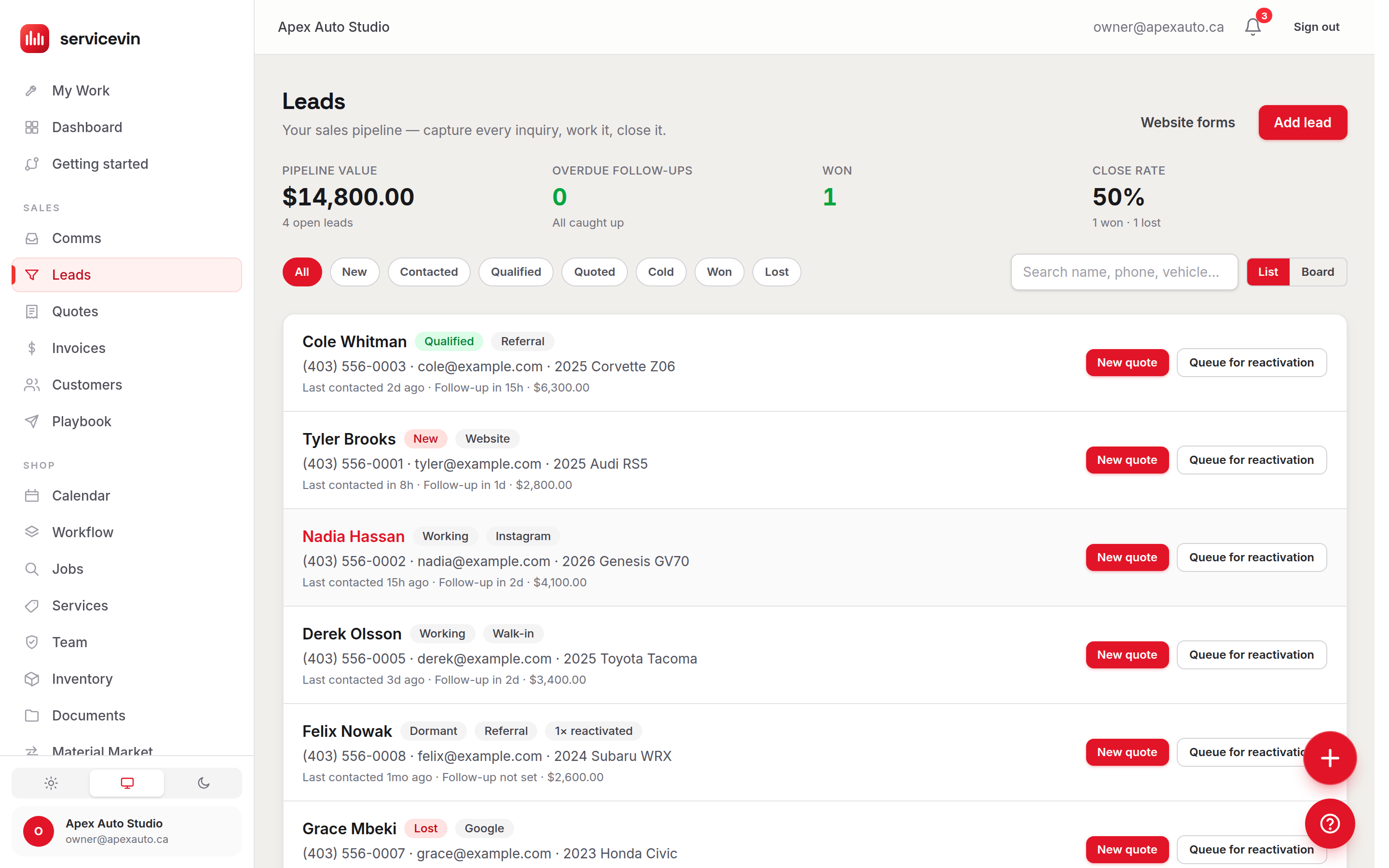
Two views, one toggle. List shows each lead with its source, service interest, last-contact and follow-up dates (overdue ones in red) and estimated value. Board lays the same leads out as a kanban: one column per funnel stage plus Cold and Lost parking lots, each with its count and total value. Cards move with the ‹ › arrows — no dragging required — and parked cards get a one-click Reopen back to Contacted.
From inquiry to money
- 1
Capture
Add leads by hand with Add lead, or point your website forms at Service VIN — see Website lead forms — and they arrive on their own, tagged with their source.
- 2
Work it
Advance the lead through the tabs as you talk. Overdue follow-ups turn red in the list and on board cards so nothing goes quiet by accident.
- 3
Quote it
Press New quote on any lead — it opens the quote builder with the lead already attached. The button needs some contact info on the lead (phone, email or company).
- 4
Or win it back later
Gone cold? Queue for reactivation hands the lead to the Win-Back Agent, which texts a re-engagement message on your rules. It needs a phone number on the lead.
Troubleshooting
The New quote button is greyed out on a lead.
Why: The lead has no phone, email or company name, so there's nothing to build a customer record from.
Fix: Open the lead, add a phone or email, and the button lights up.
Close rate shows "—".
Why: No leads have been marked Won or Lost yet, so there's nothing to compute.
Fix: Close out finished leads — the rate appears as soon as at least one is Won or Lost.
Common questions
What counts toward Pipeline value?
The estimated value on your open (not Won/Lost) leads. Set it on each lead — board columns also subtotal it so you can see where the money sits.
Can I drag cards on the board?
Cards move with the ‹ and › buttons rather than drag-and-drop — one click forward or back, and Reopen for anything parked in Cold or Lost.